

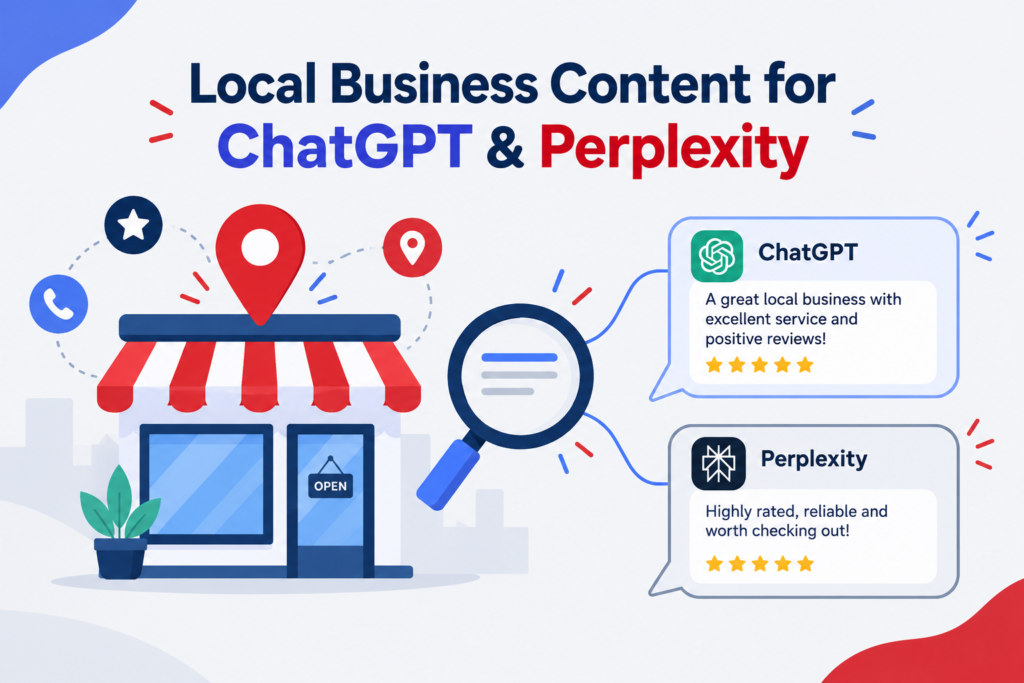
To get a local business named in ChatGPT and Perplexity answers, do these seven things: let their crawlers read your site, complete your Yelp and Google profiles, keep your name, address and phone number identical everywhere, build clear service and location pages, collect real reviews, earn mentions on local websites, and test your results every month. Neither company has published a ranking formula for local results, so no one can promise you a spot. This guide separates what is confirmed (official documentation and news reports) from what only vendors claim, so you do not spend money on myths.
The quick answer: a 7-step checklist
- Allow the right crawlers. Let OAI-SearchBot (ChatGPT search) and PerplexityBot (Perplexity) read your site.
- Complete the listings AI tools read. Start with Yelp and Google Business Profile, then Bing Places and Foursquare.
- Make your business details consistent. Same name, address and phone number everywhere.
- Build one page per service and location. Put the plain answer in the first few sentences.
- Earn real reviews. Recent, specific reviews help people and help AI tools describe you.
- Get mentioned on local sites. Local news, chambers of commerce and trade groups.
- Test and track. Ask the same questions your customers ask and log what happens.
How ChatGPT and Perplexity answer local questions
When someone types “best electrician near Headingley,” both tools do the same basic thing. They look at web pages and data sources, pick a few businesses, and write a short answer. The difference is where they look.
| Comparison | ChatGPT | Perplexity |
|---|---|---|
| How it works | Web search using its own index, plus licensed local data | Live web search, answer written with citations |
| Crawler to allow | OAI-SearchBot | PerplexityBot |
| Confirmed local data partner | Yelp (reported by Axios, July 2026) | None officially published |
| Reported but not confirmed | Foursquare, Bing | Yelp pages cited often, according to vendor analyses |
| Published local ranking formula | No | No |
ChatGPT. Yelp is licensing its reviews, ratings, photos and business details to OpenAI so ChatGPT can use them in local answers. Axios reported the deal on July 23, 2026. Yelp says its network holds about 330 million cumulative reviews and more than 8 million business listings. OpenAI controls how the content is shown, and the financial terms were not disclosed. A “Request a Quote” feature is planned. Many older guides say Foursquare supplies most of ChatGPT’s local results, with figures like 60 to 70 percent. Those numbers come from vendor blogs, and OpenAI has not published a breakdown, so treat them as unverified.
Perplexity. It runs a live web search for each question, retrieves pages, and quotes the passages that answer it. Vendor analyses say Yelp, TripAdvisor, local news and business websites show up often in its local answers. One source claims a direct Yelp API integration, while others describe plain web retrieval. Because the evidence conflicts, the safe move is to be present and accurate on all of these sources.
Why the stakes are real. Vendor-reported analyses suggest AI answers often name only one to four businesses, compared with the larger set a map pack shows. That is a claim from marketing studies, not an official figure, but it explains why being left out costs more than ranking fifth on a list.
What about Google?
Google’s own guidance says there are no additional requirements or special optimizations for AI Overviews and AI Mode, and that normal SEO fundamentals still apply. It also says these features can use a technique called query fan-out, which means running several related searches across subtopics to build one answer. In practice, a page that covers a topic fully has more chances to be picked up. Everything in this guide that helps people also helps Google.
Step 1: Let AI crawlers read your website
A crawler is a program that visits web pages and reads them. If it cannot visit yours, nothing else in this guide matters.
| Bot | Company | What It Does | Allow It? |
|---|---|---|---|
| OAI-SearchBot | OpenAI | Finds pages to show in ChatGPT search answers | Yes, if you want ChatGPT visibility |
| GPTBot | OpenAI | Collects content that may train OpenAI models | Your choice; it does not affect search visibility |
| ChatGPT-User | OpenAI | Fetches a page when a user asks | Not used to decide search appearance |
| PerplexityBot | Perplexity | Finds pages to show and link in Perplexity results | Yes |
| Perplexity-User | Perplexity | Fetches a page when a user’s question needs it | Generally ignores robots.txt |
Add this to your robots.txt file (the text file at yourwebsite.com/robots.txt):
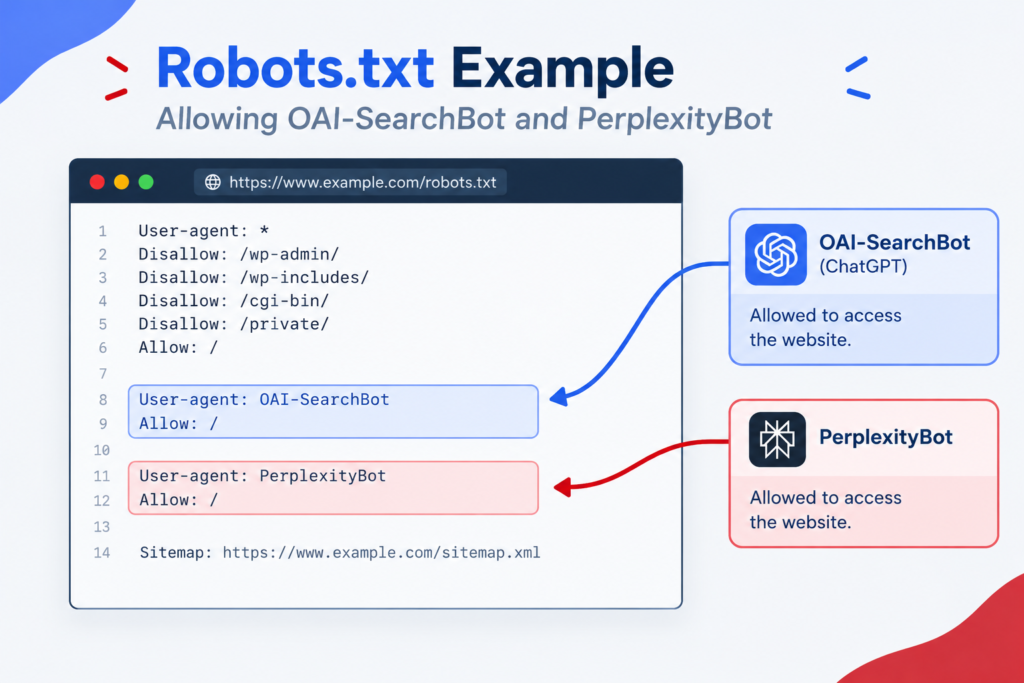
Three points trip people up:
- Blocking GPTBot does not remove you from ChatGPT search. OpenAI treats each setting as independent. A site can allow OAI-SearchBot while disallowing GPTBot. The reverse also holds: allowing GPTBot does not put you in search.
- Opting out of OAI-SearchBot removes you from answers. OpenAI says such sites will not appear in ChatGPT search answers, though they may still show as navigational links.
- Changes take time. OpenAI says its systems can take about 24 hours to adjust after a robots.txt update.
Check your firewall or CDN settings too. Some security tools block unknown bots by default, which stops these crawlers even when robots.txt allows them. Both OpenAI and Perplexity publish IP address lists you can use to allow their requests. Your server logs will show whether the bots actually visit.
Step 2: Complete the listings AI tools read
Think of listings as your business card on other people’s websites. AI tools check them to confirm you exist, where you are, and what customers say.
Yelp (do this first). Because of the OpenAI deal, your Yelp profile can now feed ChatGPT answers. Claim the listing, choose accurate categories, add hours, services and real photos, and reply to reviews. Yelp filters reviews it considers suspicious and discourages asking customers for reviews, so earn them through good service.
Google Business Profile. It powers Google Maps and local results and is the profile customers see most. Fill in every field, pick the right primary category, and keep hours current.
Bing Places. It is free and can import from your Google profile. Several vendors say ChatGPT relies on Bing, but the evidence is mixed, and one analysis argued ChatGPT does not read Bing Places listings directly. It costs almost nothing, so treat it as cheap insurance.
Foursquare. Claiming a listing is free. Its weight inside ChatGPT is reported by vendors but not confirmed by OpenAI.
Industry directories. Plumbers, dentists, lawyers and restaurants each have trade directories (for example TripAdvisor for hospitality). Perplexity-focused vendor guides say these appear often in citations. Check which ones your category’s AI answers actually cite, then claim those.
Keep your business details identical (NAP consistency)
NAP means name, address and phone number. If your website says “John Smith Plumbing & Heating Ltd,” Yelp says “J Smith Plumbing,” and Google says “Smith Plumbing Leeds,” a system comparing sources has less reason to trust any of them. Pick one exact version and copy it everywhere, including your website footer.
Step 3: Build service and location pages that answer the question
Your own website is the one source you control. It should state, in plain words, what you do, where, for whom and roughly what it costs.
Make one page per main service and per location you serve. A plumber covering Leeds and Wakefield would have a page for boiler repair in Leeds, boiler repair in Wakefield, and so on. Do not copy the same text across towns and swap the place name. Each page needs real local detail.
Page checklist:
- H1 with the service and place: “Boiler Repair in Leeds.”
- First 2 to 3 sentences that answer the question: what you fix, where, how fast, typical price range.
- Details people ask next: service area, opening hours, licences or certifications, guarantees, how booking works.
- Proof: real project photos, named staff, review excerpts you have permission to use.
- A short FAQ built from real calls and emails.
- Contact details that match your listings exactly.
- Internal links to related services and to your main location or contact page.
Example opening (hypothetical business):
We repair and replace gas boilers in Leeds and Wakefield. Most repairs are finished in one visit, callouts start at £X, and every engineer is Gas Safe registered. Call [phone] or book online.
Anyone, human or software, can read that and know the answer in ten seconds.
Step 4: Write content that is easy to quote
To be quoted, a passage has to make sense on its own. Practical habits:
- Answer first, explain after. Put the direct answer under each heading, then the detail.
- Use headings that match real questions, such as “How much does a boiler repair cost in Leeds?”
- Use lists for steps and tables for comparisons. Only when they make the content clearer.
- Be specific. Prices, timeframes, service areas and certifications beat vague claims like “affordable and reliable.”
- Show who wrote it. Add a named author or owner with a short bio.
- Update pages. Add a visible “last updated” date and refresh prices and hours when they change.
You do not need to write in a strange “AI style.” Google’s guidance says breaking content into short chunks or writing in a special AI-friendly way is not required. Write clearly for a customer, and software can read it too.
Step 5: Add structured data (schema) the right way
Schema is a block of code that labels facts on your page, like your name, phone number and opening hours, so software does not have to guess. Google says no special schema is required for AI features, but it advises that structured data match the visible text on the page. It can also support rich results in normal search.
A simple LocalBusiness example (replace the placeholders and use a more specific type, such as Plumber or Dentist, when one fits):
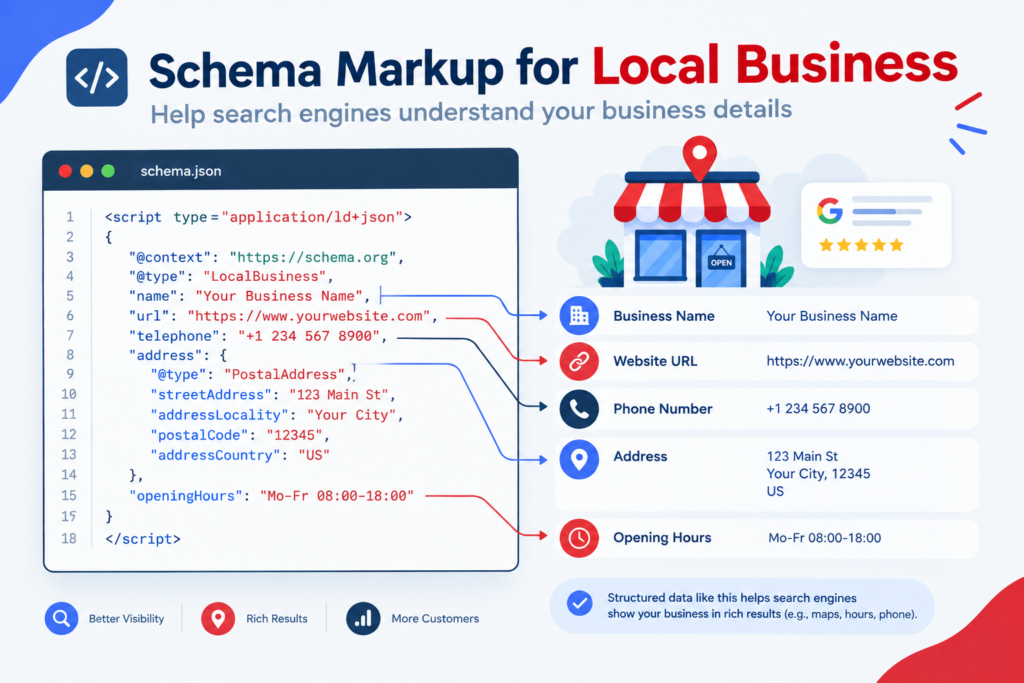
Only markup what a visitor can see on the page. Test it with Google’s Rich Results Test before publishing.
Step 6: Earn reviews that help customers and AI tools
Reviews now serve two jobs. Customers read them, and AI tools can summarize them when describing you. Yelp’s licensing deal means those reviews can appear in ChatGPT answers.
- Ask every happy customer, right after the job, with a direct link to the review page. Follow each platform’s rules on asking.
- Encourage detail. A review that names the service and the neighborhood tells a reader more than “great service.”
- Reply to every review, including negative ones, calmly and briefly.
- Aim for steady flow. Regular new reviews look more current than a burst followed by silence.
- Never buy or fake reviews. Platforms filter them, and fake feedback can damage trust and break platform rules.
Step 7: Earn mentions on local websites
When someone asks for the “best dentist in Leeds,” both tools lean on pages that already list or compare dentists. That reasoning suggests being on those pages is one of the strongest levers you have. Good sources include:
- Local news “best of” lists and business features
- Chamber of commerce and business association directories
- Trade bodies and licensing bodies in your industry
- Sponsorships of local events, clubs and charities (with a link to you)
- Local bloggers and community sites that review services
This overlaps with local link building: a link and a mention from a trusted local site helps Google rankings and gives AI tools another source that names you. Do not manufacture mentions. Google’s guidance warns that seeking inauthentic mentions may be treated as spam.
Step 8: Test your visibility and measure results
AI answers change between runs. In a three-week study by Linkifi, asking the same buying question again minutes later changed 60% of the sources ChatGPT cited. That is a vendor study, but it matches what testers see, so one check proves little.
A simple monthly test:
- Write 10 questions customers would ask, such as “best emergency plumber in Leeds” and “who fixes combi boilers near Headingley.”
- Run each in ChatGPT and Perplexity, ideally in a fresh chat.
- Record the result in a table like this one:
| Prompt | Tool | Were We Named? | Sources Cited | Were Our Details Correct? |
|---|---|---|---|---|
| Best emergency plumber in Leeds | ChatGPT | |||
| Best emergency plumber in Leeds | Perplexity |
- Look at who is named instead of you and which pages are cited. Those pages show where to build presence.
- Repeat next month and compare.
[Insert your own test results here: number of prompts, tools, dates, how often you were named, and what you changed. Original data makes this guide more useful than competing pages.]
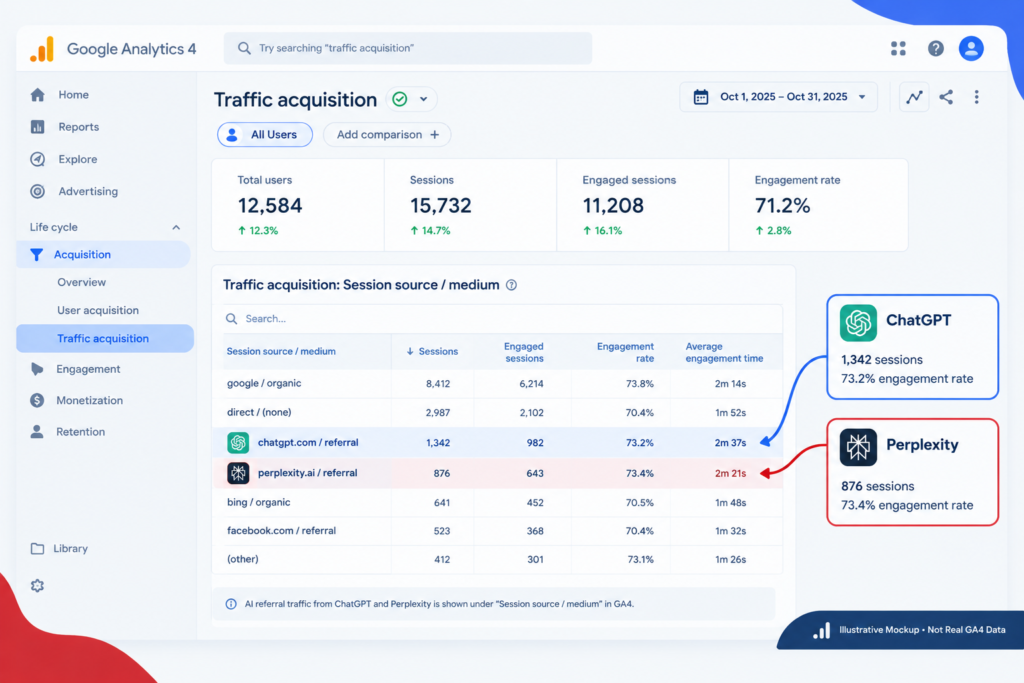
Track visits from AI tools in GA4. When a user clicks a link in ChatGPT or Perplexity, your analytics usually sees a referral from chatgpt.com or perplexity.ai. By default these land in the generic Referral channel. To see them separately, create a custom channel group in GA4 whose rule matches these sources (chatgpt.com, chat.openai.com, perplexity.ai, claude.ai, gemini.google.com, copilot.microsoft.com), and place it above the default Referral rule, otherwise it stays empty. Treat the number as a floor, because mobile apps and copy-pasted links often send no referrer. One 2026 analysis put AI referrals near 1% of sessions on enterprise sites, so expect small numbers at first.
What not to waste time on
llms.txt. It is a proposed file meant to guide AI systems. The evidence says it does not help search visibility. Google says in its guidance that Search does not use such files, and that it neither helps nor harms. An Ahrefs study of 137,210 domains found 97% of llms.txt files got zero requests in May 2026, and another test found only 84 requests among 62,100 AI bot visits. If someone sells it as an “AI ranking” service, skip it.
Special AI rewrites. Chopping pages into tiny chunks or stuffing in keywords for AI does not help. Clear writing does.
Fake mentions and reviews. They risk spam penalties and platform removals.
Guaranteed ChatGPT ranking packages. No one can guarantee this. There is no setting to buy.
Unverified percentages. Be careful with claims like “Foursquare provides 70% of results.” Without a primary source, label them as vendor claims.
Common mistakes
- Blocking OAI-SearchBot or PerplexityBot by accident through a firewall or security plugin
- Believing GPTBot controls ChatGPT search visibility
- Ignoring Yelp because it “is for restaurants”
- Using different business names or phone numbers across directories
- Copying one location page and changing only the city name
- Marking up schema data that does not appear on the page
- Checking AI answers once and drawing conclusions
- Treating AI search as separate from SEO, when most of the work overlaps
A 30-day action plan
Week 1: Access and profiles. Check robots.txt and firewall settings. Claim and complete Yelp, Google Business Profile, Bing Places and Foursquare. Pick your official name, address and phone number and fix mismatches.
Week 2: Pages. Build or improve your top service and location pages using the checklist in Step 3. Add LocalBusiness schema that matches the page.
Week 3: Reviews and mentions. Set up a routine for asking for reviews. Pitch two or three local sites for a mention, listing or feature.
Week 4: Test and track. Run your first 10-prompt test, set up the GA4 AI channel, and write down your baseline. Repeat every month.
Where the evidence is mixed
Being honest about uncertainty builds trust, so here is what is not settled:
- ChatGPT’s local data mix. Yelp is confirmed by news reports. Foursquare and Bing are widely reported by vendors but not confirmed with numbers by OpenAI.
- Perplexity and Yelp. Sources disagree on whether there is a direct integration. Yelp is cited often either way.
- Review weight. Vendors say review count and recency matter, but neither company publishes how much.
- How often AI answers change. They vary by run, location and wording, so avoid one-time conclusions.
Check official documentation again every few months, because this area is changing fast.
FAQs
1. How do I get my local business recommended by ChatGPT?
Allow OAI-SearchBot, complete your Yelp and Google profiles, keep your business details consistent, publish clear service and location pages, earn real reviews, and get mentioned on local sites. No setting guarantees a recommendation.
2. Does blocking GPTBot remove my site from ChatGPT search?
No. GPTBot relates to model training, and OAI-SearchBot controls search visibility. OpenAI treats them as separate settings.
3. Does Perplexity follow robots.txt?
Perplexity says PerplexityBot follows it, but Perplexity-User, which fetches pages on a person’s request, generally ignores robots.txt.
4. Does ChatGPT use Google Business Profile?
There is no official confirmation. Reported local sources include Yelp, Foursquare and Bing. Keep your Google profile accurate anyway, since Google’s own local results depend on it.
5. Do I need schema markup for AI search?
No special schema is required, according to Google. Accurate LocalBusiness markup that matches your page is still good practice.
6. Do I need an llms.txt file?
No. Google says Search does not use it, and studies show AI crawlers rarely request it.
7. Is optimizing for AI search different from SEO?
Mostly no. Clear pages, accurate listings, real reviews and trusted mentions help in Google, ChatGPT and Perplexity. The differences are mainly which crawlers you allow and which listing sources matter.
8. How long does it take to show up?
There is no reliable timeline. A robots.txt change can register within about a day, but being named depends on your listings, reviews and mentions, and results vary between runs.
References
- OpenAI crawler documentation: https://developers.openai.com/docs/bots
- Perplexity crawler documentation: https://docs.perplexity.ai/docs/resources/perplexity-crawlers.md
- Google Search Central, AI features and your website: https://developers.google.com/search/docs/appearance/ai-features
- Axios, Yelp and ChatGPT partnership (July 23, 2026): https://axios.com/2026/07/23/yelp-reviews-chatgpt-geo-partnership