

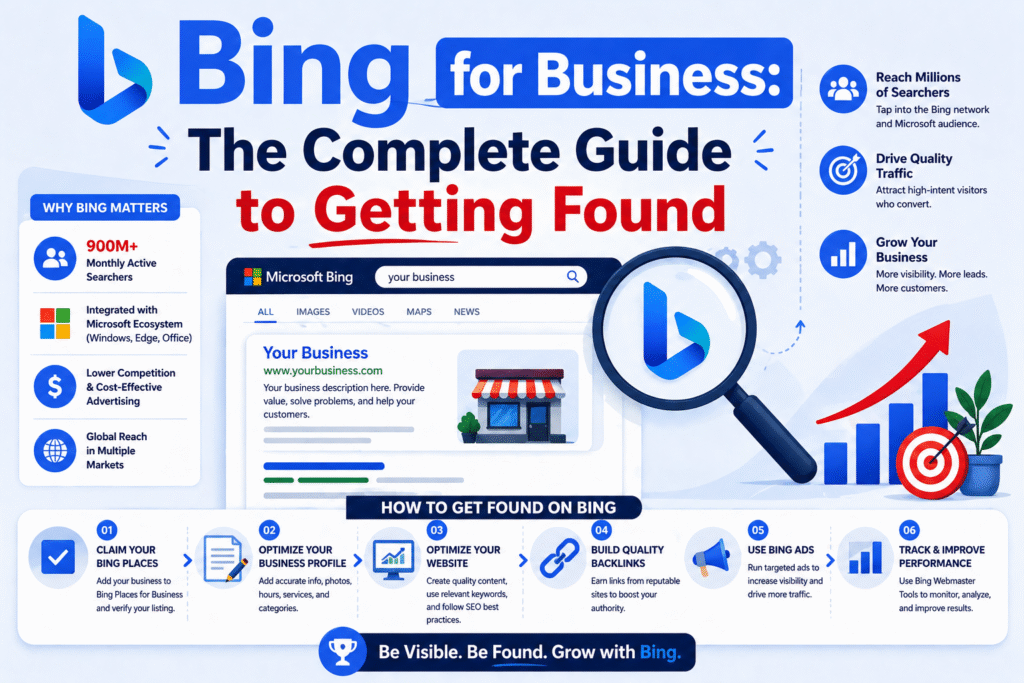
If you’re a business owner focused only on Google, you’re leaving money on the table. Seriously.
Most of your competitors are doing the exact same thing — pouring every dollar and every hour into Google rankings, Google Ads, and Google Business Profiles. And while Google absolutely deserves your attention, there’s a whole other search engine quietly sending high-quality, ready-to-buy traffic to businesses smart enough to show up there.
Now, before you roll your eyes — hear me out. Bing for business in 2026 is not the same story it was five years ago. It’s grown into something much bigger than a second-place search engine. Today, Bing powers Microsoft Copilot, ChatGPT Search, DuckDuckGo, Yahoo, and Alexa — meaning one solid Bing strategy puts you in front of users across an entire ecosystem of AI-powered tools and platforms.
This guide is going to walk you through everything — from setting up your free Bing business listing to understanding how Bing SEO works differently from Google, and why that difference is actually an opportunity for small businesses right now.
What Is Bing for Business and Why It Still Matters in 2026
“Bing for business” isn’t a single product or tool. It’s really an umbrella term that covers all the ways Microsoft’s Bing search engine helps businesses get discovered online. That includes Bing Places for Business (their version of Google Business Profile), Bing Webmaster Tools, Bing Ads (now Microsoft Advertising), and Bing’s growing role in AI-powered search results.
A lot of people write off Bing because Google has around 90% of the global search market. Fair enough. But that stat doesn’t tell the whole story.
The Bing Ecosystem: More Than Just a Search Engine
Here’s what most people miss. When you optimize your business for Bing, you’re not just showing up on Bing.com. You’re tapping into the entire Microsoft Search Network, which includes:
- Bing.com — the search engine itself
- Microsoft Copilot — Microsoft’s AI assistant with over 100 million monthly active users
- ChatGPT Search — OpenAI’s search feature, which pulls results directly from Bing’s index
- DuckDuckGo — the privacy-first search engine powered by Bing
- Yahoo Search — still active, still Bing-powered
- Windows Search — built into every Windows PC
- Microsoft Edge — the default browser for hundreds of millions of devices
Think about that for a second. One optimization effort. Multiple platforms. That’s a deal that’s hard to ignore.
Who Uses Bing? (And Why They’re Your Ideal Customer)
Here’s the part that should really get your attention. Bing users aren’t random internet browsers. According to data from early 2026, the typical Bing user is a professional aged 35 to 54, with a household income above $75,000. They use desktop computers, they research before they buy, and they convert at higher rates than the average Google visitor.
For B2B companies, professional services, financial advisors, real estate agents, and anyone selling premium products — this is your audience. They’re educated, they have purchasing power, and right now, very few of your competitors are targeting them on Bing.
Bing Places for Business — Your First Step to Local Visibility
If you do nothing else after reading this article, do this one thing: claim your Bing Places for Business listing.
Bing Places is completely free. It works similarly to Google Business Profile — it puts your business on the map (literally), shows your hours, phone number, website, photos, and reviews right in the search results. For local businesses especially, this is one of the easiest visibility wins available in 2026.
How to Set Up Your Bing Business Listing (Step-by-Step)
Getting started takes less than 20 minutes. Here’s exactly how to do it:
Step 1 — Go to Bing Places for Business
Head over to bingplaces.com and sign in with your Microsoft account. If you don’t have one, creating it is free and takes two minutes.
Step 2 — Search for Your Business
Type in your business name and location. Bing may already have a basic listing for your business pulled from other directories. If so, you can claim it rather than starting from scratch.
Step 3 — Verify Your Business
Bing will ask you to verify that you actually own the business. The most common method is a phone verification or a postcard sent to your business address. Complete this step — unverified listings show up much less frequently in results.
Step 4 — Fill Out Every Field
Don’t skip anything. Add your business name, address, phone number, website URL, business hours, categories, and a description. Upload real, high-quality photos of your location, products, or team.
Step 5 — Keep It Consistent
Make sure the name, address, and phone number on your Bing listing match exactly what’s on your website and every other online directory. This consistency — called NAP consistency — is a confirmed local ranking signal.
How to Optimize Your Bing Places Profile to Rank Higher
Creating a listing is the starting line. Optimizing it is how you win the race. Here are the things that actually move the needle:
Write a keyword-rich business description. Bing loves exact keywords. If you’re a “family dentist in Austin, Texas,” say that clearly in your description. Don’t be vague. Don’t just say “we provide dental services.” Be specific, be local, and include the terms people actually search for.
Choose the right categories. Pick the most specific category that fits your business. Bing uses this to match you with relevant searches, so choosing a broad category like “Business” when you’re actually a “Plumbing Contractor” will hurt your visibility.
Add lots of photos. Listings with photos get significantly more clicks and engagement. Upload your storefront, your team, your work, your products — anything that builds trust and shows what you actually do.
Collect reviews. Ask your happy customers to leave you a review on Bing. Reviews are a ranking factor on Bing Places, and they also build immediate trust with anyone who finds your listing. A business with 40 reviews will almost always get the click over one with zero.
Update your hours. Make sure your holiday hours, special closures, and seasonal changes are reflected in your listing. Outdated information frustrates customers and signals neglect to the algorithm.
Bing SEO for Small Business — How to Actually Rank on Bing
Here’s where things get really interesting for small businesses. Bing’s ranking algorithm is different from Google’s in some very specific ways — and those differences work in your favor if you understand them.
Exact Keywords Still Win on Bing (Here’s Why That’s Good News)
Google has spent years moving away from exact keyword matching. Its algorithm now tries to understand meaning, context, and user intent — which means you can rank for a keyword even if your page doesn’t use that exact phrase.
Bing is more straightforward. It still places heavy emphasis on exact keyword matches in your title tags, H1 headings, and meta descriptions. This is actually great news for small businesses because it means you have more predictable, more controllable ranking signals.
If someone searches Affordable wedding photographer in Sydney and that phrase appears clearly in your page title and main heading, Bing rewards that precision. You’re not trying to decode a complex algorithm. You’re speaking the same language as the search engine.
The practical lesson here: when writing content for Bing, use the exact terms your customers type. Don’t over-cleverly rephrase things. If your keyword is “bing local business listing,” use that phrase — don’t swap it out for “Bing regional enterprise directory presence.”
On-Page SEO Tips Specific to Bing’s Algorithm
These are the on-page factors Bing weighs most heavily for business pages:
Title Tags — Put your primary keyword as early in the title as possible. Keep it under 60 characters. Bing reads this as one of the strongest relevance signals on your page.
H1 Heading — Every page should have one clear H1 that includes your main keyword. Don’t try to be clever or poetic here. Be clear and direct.
Meta Descriptions — Unlike Google, which sometimes ignores your meta description and writes its own, Bing uses your meta description more consistently. Write it with your keyword included naturally, and make it compelling enough to earn the click.
Content Length — Bing tends to favor content of at least 1,000 words for competitive topics. Depth signals authority. This doesn’t mean padded fluff — it means genuinely covering the topic well.
Page Speed — Slow pages hurt you on Bing just like they do on Google. Compress your images, use a CDN if possible, and check your load times regularly with free tools like Google PageSpeed Insights (yes, it works for Bing optimization too).
Multimedia — Bing places more weight on multimedia content than Google does. Adding relevant images, an explanatory video, or an infographic to your page can give you a genuine ranking advantage on Bing.
Backlinks and Social Signals: Bing’s Secret Ranking Sauce
Two things that Bing weighs differently from Google: backlinks and social signals.
On the backlink side, Bing evaluates links at the page level rather than the domain level. This means a link from a highly relevant page on a mid-authority site can be more valuable than a link from a huge domain that has nothing to do with your industry. Focus on getting linked from relevant, topically-related sources — local news sites, industry blogs, business directories, and partner websites.
On the social signals side, Bing is one of the few search engines that openly confirms social engagement as a ranking factor. When your content gets shared on LinkedIn, Facebook, or Twitter/X, Bing sees that as a vote of relevance and authority. This is especially powerful for B2B businesses on LinkedIn — a platform that Microsoft owns, making the data connection even tighter.
So don’t just publish content. Share it. Engage with it. Build a real social presence around your brand, and Bing will reward you for it.
Bing Webmaster Tools for Business — Free, Powerful, Ignored
If Google Search Console is the most underused free tool in digital marketing, then Bing Webmaster Tools is the most completely overlooked. Almost nobody uses it. Which means if you use it, you have an immediate information advantage over your competitors.
How to Set Up Bing Webmaster Tools
Go to bing.com/webmasters and sign in with your Microsoft account. Add your website by entering your URL, then verify ownership. Bing gives you three ways to verify: adding an XML meta tag to your homepage, uploading an XML file to your server, or adding a CNAME record to your DNS. If you’re not technically inclined, the XML meta tag method is the easiest.
Once you’re verified, submit your XML sitemap. This tells Bing exactly what pages you have and how they’re structured, which speeds up crawling and indexing significantly. If your website runs on WordPress, a plugin like Yoast SEO or Rank Math generates a sitemap for you automatically.
Key Features Every Business Owner Should Use
Site Scan — This is Bing’s built-in SEO auditing tool. It crawls your site and returns a list of issues affecting your visibility — missing meta tags, broken links, slow pages, duplicate content. Run this when you first set up Webmaster Tools, and then check it monthly.
Keyword Research — Bing Webmaster Tools includes a keyword research section that shows you what queries are driving impressions for your site and suggests related terms. This is Bing-specific data you can’t get from Google tools.
Backlink Data — You can see which sites are linking to you in Bing’s eyes. This often differs from what Google Search Console shows, so it’s worth cross-referencing.
IndexNow — This is one of Bing’s best kept secrets. IndexNow is a protocol that lets you notify Bing instantly whenever you publish or update a page. Instead of waiting weeks for Bingbot to discover your new content, it shows up in the index within hours. Setting it up is simple and completely free.

Bing vs Google for Business — Which One Should You Focus On?
This is the question everyone asks. And the answer is: both — but with different strategies.
Where Bing Beats Google for Business Owners
There are a few specific scenarios where Bing genuinely outperforms Google for business owners, and it’s worth knowing them.
Lower competition, faster rankings. Because most businesses ignore Bing, the competition for top positions is dramatically lower. Keywords that would take 12 to 18 months to rank for on Google can often be achieved on Bing in 8 to 12 weeks — sometimes faster. For a new business or a new website, this matters enormously.
Better conversion rates. Multiple studies have shown that Bing visitors convert at a higher rate than Google visitors for certain industries. The WordStream data showing Bing Ads converting at 2.94% versus Google’s 2.70% is just one example. When your audience skews older, more professional, and more affluent, Bing delivers.
Cheaper paid advertising. If you run paid ads, Microsoft Advertising (formerly Bing Ads) consistently offers lower cost-per-click than Google Ads for most industries. You reach a similar quality of buyer for less money.
The Smart Strategy: Do Both Without Extra Work
Here’s the beautiful thing about modern SEO. If you’re already doing good work for Google — writing quality content, building legitimate backlinks, maintaining a fast website, using structured data — you’re already most of the way to ranking on Bing too.
The extra Bing-specific steps are small: set up your Bing Places listing, verify your site in Bing Webmaster Tools, submit your sitemap, enable IndexNow, and make sure your exact keywords appear clearly in your titles and headings.
That’s maybe three to four hours of setup work that opens up an entirely parallel traffic channel. The ROI on that time is almost always positive.

Bing AI Search & Microsoft Copilot — The New Business Opportunity
This is the section that most blogs about Bing for business completely miss. And it might be the most important part of the entire guide right now.
How Ranking on Bing Gets You Into ChatGPT & Copilot Answers
When someone asks ChatGPT a question that requires real-time web information — “What’s the best accountant near me?” or “Which software is best for managing restaurant inventory?” — ChatGPT searches the web to find answers. And it uses Bing’s index to do it.
The same is true for Microsoft Copilot, which has over 100 million monthly users across Windows, Edge, and Microsoft 365. When Copilot generates an answer that cites a source, it’s pulling from Bing’s ranked results.
This means that ranking on Bing isn’t just about appearing on Bing.com anymore. It’s about being the source that AI tools cite when your customers ask AI assistants for recommendations. That’s a fundamentally new kind of visibility — and it’s growing fast.
GEO (Generative Engine Optimization) for Bing
GEO — Generative Engine Optimization — is the practice of optimizing your content to appear in AI-generated answers, not just traditional search results. For businesses targeting Bing’s ecosystem, this means a few practical things:
Answer questions directly. AI tools love content that clearly states a question and then answers it. Use FAQ sections. Use H2 headings phrased as questions. Write intro paragraphs that define your topic in plain language.
Use structured data (schema markup). Schema helps Bing and AI tools understand exactly what your content is about — whether it’s a local business, a product, a service, a review, or an article. The more structured your data, the easier it is for AI to cite you accurately.
Keep your content factually authoritative. AI systems favor sources that are specific, cited, and accurate. Vague opinion pieces don’t get pulled as sources. Well-researched, specific, useful content does.
Don’t block AI crawlers. Check your robots.txt file to make sure you’re not blocking OAI-SearchBot (OpenAI’s crawler for ChatGPT citations) or Bingbot. Some security plugins accidentally block these bots, making you invisible to AI search.
Conclusion
Not because Bing is going to replace Google. It won’t. But because in 2026, optimizing for Bing means reaching a high-value audience on Bing.com, appearing in Microsoft Copilot answers, getting cited by ChatGPT Search, and showing up in DuckDuckGo and Yahoo — all from a single set of optimization efforts that most of your competitors haven’t bothered with.
The businesses winning on Bing right now aren’t bigger or better resourced than their competitors. They’re just paying attention when everyone else isn’t. A free Bing Places listing, a verified Webmaster Tools account, a properly structured page, and consistent keyword usage — these are not complicated or expensive moves. They’re just moves that most people skip.
FAQ’s
1. Is Bing good for small businesses?
Yes. Bing is particularly valuable for small businesses because competition for rankings is significantly lower than on Google. This means faster rankings, lower advertising costs, and a chance to reach a high-income professional audience that converts well.
2. How do I get my business on Bing?
Go to bingplaces.com, sign in with a free Microsoft account, and claim or create your business listing. Verify your ownership by phone or postcard, then complete your profile with your address, hours, photos, and description.
3. Is Bing Places for Business free?
Yes, completely free. Creating, claiming, and managing your Bing Places for Business listing costs nothing.
4. Does Bing SEO help with ChatGPT visibility?
Yes. ChatGPT Search uses Bing’s index to retrieve real-time web results. Pages that rank well on Bing have a structural advantage in being selected as sources in ChatGPT’s answers.
5. What is the difference between Bing Places and Google Business Profile?
Both serve the same purpose — showing your business details in local search results — but they operate on different platforms. Google Business Profile appears on Google Search and Maps, while Bing Places appears on Bing and the Microsoft Search Network. Ideally, you should have both set up and fully optimized.