

An Amazon storefront is your custom brand page on Amazon where you can showcase your products in a clean, organized, and visually appealing way. Instead of sending customers to a single product listing, a storefront allows you to display your entire product catalog, tell your brand story, and guide shoppers through a curated buying experience.
Think of it like your mini website inside Amazon—but without needing to build a website from scratch.
When someone visits your storefront, they can browse different categories, explore collections, and discover multiple products in one place. This not only improves the shopping experience but also increases your chances of higher conversions and more sales
Why an Amazon Storefront Matters
Creating an Amazon storefront is not just about design—it’s a powerful marketing tool. Here’s why it’s important:
- It helps you build a strong brand identity on Amazon
- You can showcase multiple products instead of relying on a single listing
- It improves customer trust and credibility
- It increases average order value (AOV) by encouraging shoppers to explore more
- It allows better product discovery through internal Amazon traffic
Key Features of an Amazon Storefront
An Amazon storefront comes with several features that make it highly effective for sellers and influencers:
- Custom layout design using Amazon Store Builder
- Product collections organized by category
- High-quality images and videos for better engagement
- Clickable product sections that lead directly to listings
- Mobile-friendly design for better user experience

Requirements to Create an Amazon Storefront
Before you start building your Amazon storefront, it’s important to understand that not everyone can create one immediately. Amazon has specific requirements depending on the type of storefront you want to build.
There are two main paths:
- Amazon Seller Storefront (for brands and sellers)
- Amazon Influencer Storefront (for content creators)
Let’s break both down in a simple way so you know exactly what you need.
Amazon Brand Registry Requirements
If you want to create a professional Amazon seller storefront, you must be enrolled in the Amazon Brand Registry. This is because Amazon only allows verified brands to build a custom Amazon brand store.
Here’s what you need:
1. A Registered Trademark
You must have an active registered trademark for your brand name. This can be:
- Text-based trademark (brand name)
- Image-based trademark (logo)
This is the most important requirement to unlock your Amazon store builder.
2. Amazon Seller Account
You need a professional Amazon seller account (not an individual one). This gives you access to advanced features like:
- Amazon storefront creation
- A+ Content
- Brand analytics
3. Brand Name on Products
Your products must clearly display your brand name. Amazon uses this to verify that you actually own the brand you’re trying to promote.
4. Enrollment in Brand Registry
Once your trademark is approved, you can apply for Amazon Brand Registry. After approval, you’ll unlock:
- Amazon storefront design tools
- Custom brand pages
- Enhanced brand content
Amazon Influencer Program Requirements
If you don’t own products or a brand, you can still create an Amazon influencer storefront. This option is perfect for people who want to earn through affiliate marketing.
Here’s what you need:
1. Active Social Media Account
You must have an active presence on platforms like:
- YouTube
- TikTok
Amazon checks your profile for content quality, engagement, and consistency.
2. Decent Audience Engagement
You don’t need millions of followers, but you should have:
- Good engagement (likes, comments, shares)
- Consistent content posting
- A niche-focused audience
This increases your chances of approval for the Amazon influencer storefront.
3. Apply for Amazon Influencer Program
You can apply directly through Amazon. If approved, you’ll get access to:
- Your own Amazon storefront page
- Ability to create product recommendation lists
- Commission on every sale made through your links
4. Content That Promotes Products
To succeed, you need to regularly create content like:
- Product reviews
- Unboxing videos
- Tutorials
- Recommendations
This helps drive traffic to your Amazon store page and increase earnings.
How to Make an Amazon Storefront (Step-by-Step)
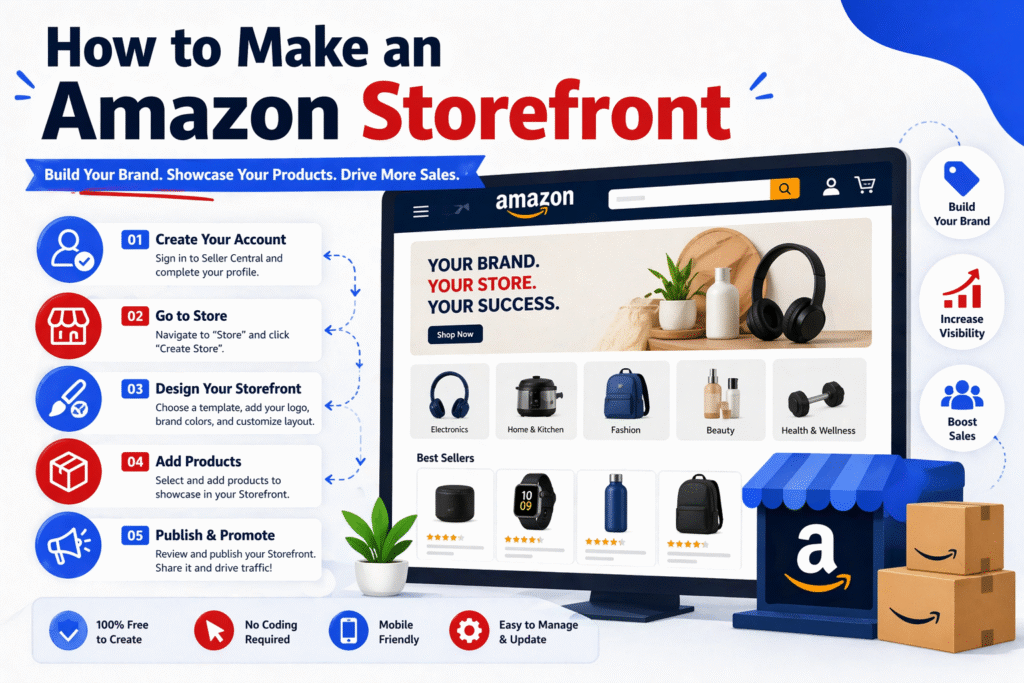
Now that you understand the requirements, let’s move to the most important part—how to make an Amazon storefront step by step. Don’t worry, the process is simple and beginner-friendly. You don’t need any technical skills to create a professional-looking Amazon store page.
Step 1: Sign in to Amazon Seller Central or Influencer Account
First, log in to your account depending on your goal:
- For brands and sellers → Sign in to Amazon Seller Central
- For content creators → Sign in to your Amazon Influencer account
Once you’re inside, you’ll get access to tools like the Amazon store builder and storefront dashboard.
After logging in, go to the menu and find the “Stores” option. Then click on “Manage Stores” and select your brand.
Now click on “Create Store” to open the Amazon Store Builder.
This is where the magic happens—you’ll build your entire Amazon brand store using a simple drag-and-drop system.
Step 3: Choose a Template or Layout
Amazon gives you ready-made templates to make things easy. You can choose from different layouts based on your needs, such as:
- Product grid layout
- Highlight or showcase layout
- Blank layout (for full customization)
If you’re a beginner, it’s best to start with a pre-designed template and customize it later.
Step 4: Add Products and Categories
Now it’s time to organize your store.
You can:
- Add your products directly from your listings
- Group them into categories or collections
- Create separate pages for different product types
For example:
- Home page
- Best sellers
- New arrivals
- Category-based pages
This makes your Amazon store page easy to navigate and improves user experience.
Step 5: Design Your Store (Images, Banners, Videos)
This is where you make your storefront look professional.
You can add:
- High-quality banner images
- Lifestyle product images
- Promotional videos
- Text sections for brand storytelling
A well-designed Amazon storefront design helps build trust and keeps customers engaged longer.
Step 6: Optimize Store Content for SEO
Most people skip this step—but it’s critical if you want traffic.
To optimize your Amazon store page SEO, you should:
- Use relevant keywords in titles and descriptions
- Add clear and descriptive headings
- Include LSI keywords like:
- amazon brand store
- amazon storefront products
- shop by category amazon
- Keep content simple and user-focused
This helps your storefront perform better in Amazon search results (A9 algorithm) and even on Google.
Step 7: Preview and Publish Your Storefront
Before going live, always preview your store.
Check:
- Mobile and desktop layout
- Product links
- Image quality
- Navigation flow
Once everything looks good, click “Submit for Publishing”.
Amazon will review your store, and once approved, your Amazon storefront page will go live.
How to Design a High-Converting Amazon Storefront
Creating an Amazon storefront is easy—but designing one that actually drives sales and conversions is where most people struggle.
A high-converting Amazon store page is not just about looking good. It should guide visitors, build trust, and make it easy for them to buy. Let’s break it down into simple, practical steps you can follow.
Use Professional Branding
Your storefront should clearly represent your brand from the first second.
Make sure you use:
- A consistent brand logo
- Matching colors and fonts
- Clean and high-quality visuals
This helps create a strong brand identity on Amazon, which builds trust with customers. When your store looks professional, people are more likely to explore your products and make a purchase.
Create Clear and Simple Navigation
If customers get confused, they leave. It’s that simple.
Organize your Amazon storefront design in a way that is easy to navigate:
- Use clear menu options like:
- Home
- Best Sellers
- New Arrivals
- Categories
- Keep your layout simple and uncluttered
- Guide users step-by-step through your products
A well-structured Amazon store layout improves user experience and increases the chances of conversion.
Add High-Quality Images and Videos
Visual content plays a huge role in selling products.
Use:
- Lifestyle images (products in real use)
- High-resolution product photos
- Short videos showing product benefits
This helps customers understand your product better and builds confidence in buying.
A visually strong Amazon storefront design keeps users engaged and reduces bounce rate.
Highlight Best-Selling Products
Don’t make customers search too much. Show them what’s already popular.
Create sections like:
- Best Sellers
- Trending Products
- Recommended Items
This works as social proof, which increases trust and encourages faster decisions.
Highlighting top products in your Amazon brand store can significantly boost your overall sales.
Focus on Mobile Optimization
Most Amazon users shop from their phones. If your store isn’t mobile-friendly, you’re losing sales.
Make sure:
- Images load quickly
- Text is easy to read
- Buttons are clickable
- Layout looks clean on small screens
Amazon automatically optimizes storefronts, but your design choices still matter.
Use Clear Call-to-Actions (CTA)
Tell your customers what to do next.
Use simple and clear CTAs like:
- Shop Now
- Explore Collection
- View Details
These small elements guide users and improve your conversion rate on Amazon.
Build Trust with Content
People don’t just buy products—they buy confidence.
You can build trust by adding:
- Brand story section
- Customer-focused messaging
- Product benefits (not just features)
This makes your Amazon storefront page feel more human and relatable.
Amazon Storefront SEO Tips (A9 Algorithm Optimization)
Creating a storefront is only half the job. If you want real results, you need to optimize it for Amazon SEO (A9 algorithm) so your products and pages get more visibility.
Unlike Google, Amazon’s algorithm focuses heavily on sales and conversions, not just keywords. So your goal is simple: make your storefront easy to find and easy to buy from.
Let’s break it down in a simple way.
Keyword Optimization Inside Store Pages
Keywords are still important—but you need to use them naturally.
When optimizing your Amazon storefront content, focus on:
- Adding keywords in page titles and section headings
- Writing simple and clear descriptions with LSI keywords
- Using terms like:
- amazon brand store
- amazon storefront products
- shop by category amazon
- amazon online store
Avoid keyword stuffing. Instead, write content that sounds natural and helps users understand your products.
Instead of writing “best amazon products cheap amazon store buy now”
Write: “Explore our best-selling products in our Amazon brand store designed for quality and value.”
Internal Linking Strategy
Internal linking means connecting different pages inside your storefront.
A strong Amazon store structure helps both users and the algorithm understand your content better.
Here’s how to do it:
- Link your homepage to category pages
- Connect category pages to individual products
- Highlight related products in each section
For example:
- “Shop skincare collection” → links to skincare page
- “View all electronics” → links to electronics category
This improves:
- Navigation
- Time spent on your store
- Product discovery
All of these are positive signals for Amazon A9 ranking.
Conversion Signals That Boost Visibility
This is the most important part—and where most people fail.
Amazon ranks products and stores that generate sales. So your storefront must be optimized for conversions.
Key conversion signals include:
- Click-through rate (CTR) → Are people clicking your products?
- Conversion rate → Are visitors buying?
- Time on store → Are users staying and exploring?
- Bounce rate → Are users leaving quickly?
To improve these:
- Use high-quality images and videos
- Highlight best-selling and trending products
- Add clear call-to-actions (Shop Now, Explore More)
- Keep your store clean and easy to navigate
The better your storefront performs, the more Amazon will push it in search results.

FAQs
1. Is Amazon storefront free?
Yes, creating an Amazon Storefront is free. However, you must be enrolled in Amazon Brand Registry, which requires a registered trademark.
2. Do I need a website to create an Amazon storefront?
No, you don’t need a separate website. Amazon provides its own platform and tools to build and host your storefront.
3. Can beginners create an Amazon storefront?
Yes, beginners can easily create an Amazon storefront using Amazon’s drag-and-drop Store Builder, even without technical skills.
4. How long does it take to build a storefront?
It can take a few hours to a couple of days, depending on how detailed your design, content, and product listings are.
5. Can I edit my Amazon storefront after publishing?
Yes, you can edit and update your storefront anytime, including adding new products, changing images, or updating content.
Conclusion
Creating an Amazon storefront is one of the smartest moves if you want to build a strong presence on Amazon.
It’s more than just a design—it’s your brand’s digital store, where customers can explore, trust, and buy your products.
If you follow the right steps:
- Set up your store correctly
- Design it for conversions
- Optimize it for Amazon SEO
You can turn your Amazon storefront into a powerful sales machine.
Start simple, keep improving, and focus on providing value to your customers—because in the end, that’s what drives real growth.