

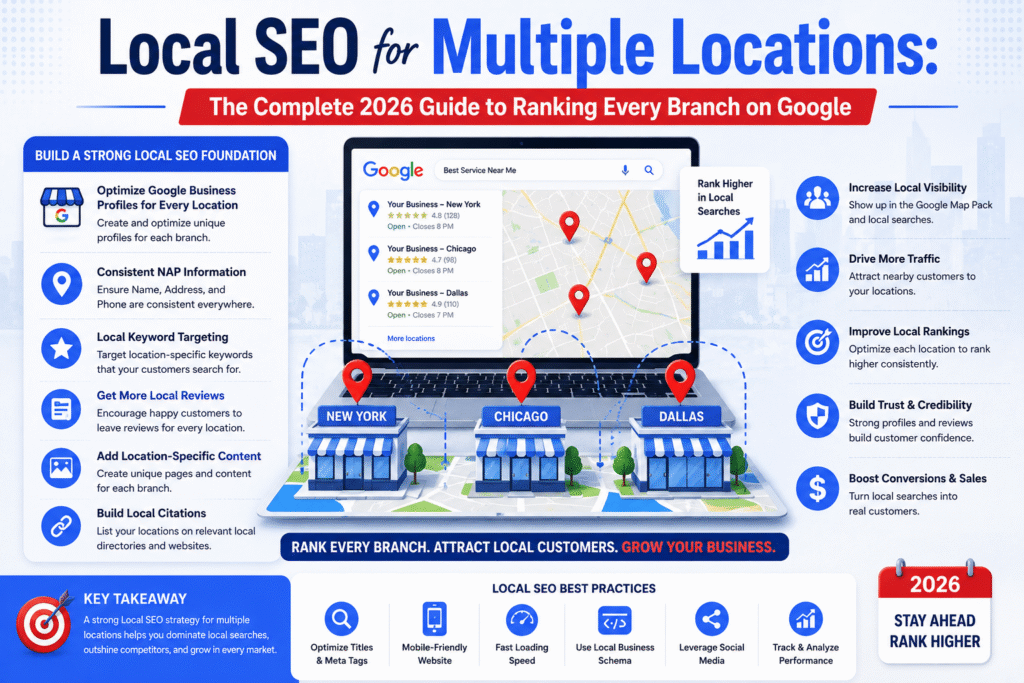
Let’s be honest — running SEO for one location is already a job. Running it for five, ten, or fifty? That’s a whole different game.
Managing multiple locations requires a structured Local SEO strategy that helps every branch compete in local search results, Google Maps, and location-based searches.
Think about it this way. If someone in Austin types “best dental clinic near me,” they don’t want results from your Dallas branch. Google knows this. And if your website isn’t set up correctly, Google will ignore your Austin location entirely — even if it’s been open for years.
That’s the core challenge. And that’s exactly what this guide solves.
Single Location vs. Multi-Location SEO — Key Differences
Single-location SEO is relatively straightforward. You optimize one Google Business Profile, one location page, and one set of local citations. Done.
Multi-location SEO is layered. Every branch needs its own:
- Dedicated location page with unique content
- Verified Google Business Profile
- Local citations with consistent NAP data
- Location-specific backlinks
- Individual review strategy
Miss any one of these for even a single branch, and that location becomes invisible online — while your competitors show up in its place.

Who Needs a Multi-Location SEO Strategy?
If any of the following sounds like you, this guide was written for you:
- You run a franchise with multiple branches
- You own a multi-city service business (plumbing, HVAC, cleaning, legal)
- You manage multiple retail stores or clinics
- You’re a marketing agency handling local SEO for clients with several locations
- You’re expanding from one city to many and want to rank from day one
Why Most Multi-Location Businesses Fail at Local SEO
Before we talk about strategy, let’s talk about what goes wrong. Because most businesses make the same three mistakes — and they cost them rankings in every city they operate in.
The “Invisibility Gap” Problem
A business opens a new branch. They post on social media, run some ads, and wait for customers to roll in. But they skip one critical step — building a local SEO presence for that location.
Six months later? Almost no organic traffic. No calls. No direction requests.
The branch is open — but online, nobody can find it.
SEO experts call this the Invisibility Gap. You’re physically in a city but digitally absent. And in 2026, if customers can’t find you online, you simply don’t exist to them.
The good news — it’s completely fixable.

Keyword Cannibalization — The Silent Ranking Killer
Most business owners don’t see this one coming.
Keyword cannibalization happens when multiple pages on your site target the same keyword. In multi-location SEO, it’s extremely common.
Say you have branches in Chicago, Houston, and Phoenix — and all three location pages target “best HVAC company.” Google doesn’t know which page to rank. So it ranks none of them reliably.
Your pages bounce up and down in search results and your competitors quietly take the traffic.
The fix is simple — keyword mapping. Assign unique, city-specific keywords to each location page so they never compete with each other.
Duplicate Content Across Location Pages
This is the most common multi-location SEO mistake — and honestly, it’s understandable. Writing unique content for 20 different cities is hard. Copying a template is easy.
But Google sees through it immediately.
If your Chicago and Houston pages say the same thing with just the city name swapped, Google will either rank neither page, suppress one, or penalize your entire site.
Every location page needs genuinely unique, locally relevant content. No shortcuts here.
Build the Right Website Architecture First
Before you write a single word of location page content, your website architecture needs to be right. Think of it as building the foundation before the walls. Get this wrong, and everything built on top becomes unstable.

How to Structure Your URLs for Multiple Locations
Keep your URL structure clean, logical, and consistent. Here are the two formats that work best:
For businesses with locations in multiple cities: yoursite.com/locations/city-name
For service-based businesses covering multiple areas: yoursite.com/services/service-name/city-name
A few rules to follow:
- Use lowercase letters only
- Use hyphens between words, not underscores
- Keep URLs short and descriptive
- Never use numbers or random characters
Consistency is key. If you switch formats halfway through, Google gets confused and so do your users.
Internal Linking Strategy That Passes Authority to Every Branch
Most businesses set up location pages and never touch them again. They just sit there — disconnected from everything else on the site.
That’s a big mistake.
Internal links are how authority flows through your website. The more connected your location pages are, the stronger they become. Follow this simple structure:
- Homepage → All location pages
- Location pages → Service pages
- Blog posts → Relevant location pages
- Location pages → Nearby location pages
This builds a web of relevance that Google follows — and rewards with better rankings.
How to Create Location Pages That Actually Rank
Location pages are the heart of your multi-location SEO strategy. But not all location pages are created equal. A thin, generic location page won’t rank. A detailed, locally relevant location page will.
Here’s the difference.
What Every Location Page Must Include
Think of each location page as a mini-website for that specific branch. It needs to answer every question a local customer might have, while also giving Google all the signals it needs to rank that page for local searches.
Every location page must have:
1. Unique Page Title and Meta Description Include the city name and primary service. Example: “HVAC Services in Chicago, IL | YourBrand”
2. H1 Tag With Location Your main heading should include both the service and the city. “Expert HVAC Services in Chicago — Fast, Reliable, Local.”
3. NAP Information (Name, Address, Phone) Display the exact address and phone number for that specific location. Format it consistently across your entire site.
4. Google Maps Embed Embed the Google Map for that specific branch. This reinforces your physical presence for both users and Google.
5. Location-Specific Content Write about the local area, mention neighborhoods you serve, reference local landmarks, and talk about the community. More on this below.
6. Reviews and Testimonials Show reviews specifically from customers at that location. This builds trust and adds fresh, unique content.
7. Team Photos or Staff Section Introduce the team at that branch. This adds authenticity and helps Google understand this is a real, active location.
8. Schema Markup Add LocalBusiness schema to every location page. This helps both Google and AI chatbots understand your business details precisely.
9. Clear Call to Action Every page should have a phone number, contact form, or booking button prominently displayed.
How to Write Unique Content for Each Location
This is the part most businesses struggle with. You have 15 locations. How do you write genuinely unique content for all 15 without losing your mind?
Here’s a practical framework:
Layer 1 — The Core Service Description (40% of content) This can follow a similar structure across locations, but rewrite it in slightly different ways. Don’t copy-paste. Rephrase, restructure, vary the examples.
Layer 2 — Local Context (40% of content) This is where you get genuinely unique. For each location, write about:
- The neighborhoods or suburbs you serve from that branch
- Local references (“We’re just off the I-90 near Millennium Park”)
- Local weather or seasonal factors that relate to your service
- Community involvement (“We sponsor the Lincoln Park youth soccer league”)
- Local customer stories or case studies
Layer 3 — Branch-Specific Details (20% of content)
- Team members at that location
- Special services or hours unique to that branch
- Awards or recognition specific to that branch
Follow this framework and every location page becomes genuinely unique — not just a city-name swap.
Local Landing Page SEO Best Practices
A few final on-page tips that make a real difference:
- Aim for at least 800–1,200 words of unique content per location page
- Use the city name naturally throughout the content — don’t stuff it
- Include FAQ sections with location-specific questions
- Add local images — photos of the actual branch, team, and surrounding area
- Make sure the page loads fast on mobile — over 60% of local searches happen on phones
- Link to the Google Business Profile for that location
Google Business Profile for Multiple Locations
If location pages are the heart of your multi-location SEO, Google Business Profile is the pulse. It’s what puts you in the Local 3-Pack — those three prominent map results that appear at the top of Google for almost every local search.
Appearing in the Local 3-Pack for each of your locations is the single biggest driver of calls, visits, and revenue from local search.
How to Manage Multiple GBP Listings From One Account
Good news here — Google makes this manageable.
You can manage multiple locations from a single Google Business Profile account using the Business Groups feature. For businesses with 10 or more locations, you can even apply for Bulk Verification, which lets you verify all locations at once rather than going through the process individually.
Here’s how to set it up cleanly:
- Go to your Google Business Profile dashboard
- Click “Add Business” and select “Add multiple businesses”
- Use a consistent naming format: “YourBrand — City Name”
- Complete every field for every location — hours, services, attributes, photos
- Verify each location (bulk verification available for 10+)
What to Post on GBP Weekly (and Why It Matters)
Most businesses set up their GBP listings and then never touch them again. That’s a serious mistake.
Google rewards active profiles. A listing that gets updated regularly signals to Google that the business is open, operating, and engaged with its community. That activity directly influences your Local 3-Pack rankings.
Post at least once a week per location. Here’s a simple weekly content rotation:
- Week 1: Promote a service or product with a photo
- Week 2: Share a customer review or success story
- Week 3: Post a local tip, seasonal update, or community news
- Week 4: Share a special offer or upcoming event
Handling Reviews Across Multiple Locations
Reviews are one of the top three ranking factors for local SEO. Not just the number of reviews — but the recency, rating, and your response rate.
Here’s something that surprises many business owners: a location with 120 recent reviews will often outrank a location with 400 older reviews. Recency matters more than volume.
For managing reviews across multiple locations:
- Set up review request automation — send a follow-up message or email after every customer interaction asking for a review
- Respond to every review, positive or negative, within 48 hours
- Use tools like BrightLocal or Podium to monitor and manage reviews across all locations from one dashboard
- Never buy fake reviews — Google’s detection has become extremely sophisticated in 2026
NAP Consistency — The Foundation Nobody Talks About Enough
NAP stands for Name, Address, Phone Number. It sounds simple. But for multi-location businesses, NAP inconsistency is one of the most common — and most damaging — SEO problems out there.
What NAP Means and Why It Breaks Your Rankings
NAP inconsistency creeps in quietly. You list your business on Yelp one week, Google the next, a local directory after that — and each time, small details get entered slightly differently.
- “Suite 4” here, “Ste. 4” there
- “YourBrand HVAC” on one platform, “YourBrand Heating & Cooling” on another
- An outdated phone number still sitting on three directories
To you, it’s the same business. To Google, it looks like untrustworthy data.
And Google won’t rank businesses it doesn’t trust.
How to Audit and Fix NAP Inconsistencies at Scale
Businesses can identify these issues faster by performing a detailed SEO audit that checks local signals, technical problems, and ranking opportunities. Search for your business name on Google and check the top 20–30 directory listings. Compare every listing against your master NAP document — the official, correct details for each location.
Tools that make this process much faster:
- BrightLocal — comprehensive citation audit and fix
- Moz Local — scans and corrects listings across major platforms
- Yext — real-time updates pushed to hundreds of directories simultaneously
Once you’ve cleaned up existing inconsistencies, create a master NAP document for each location. Anyone in your team who ever creates or updates a listing must use this document — no exceptions.
Local Citations for Multiple Locations
Local citations are online mentions of your business’s NAP information — even without a link. They appear on directories, review platforms, social media, and local websites.
Citations act as trust signals for Google. The more consistent, high-quality citations you have for each location, the more confident Google is that your business is legitimate and active in that area.
Top Citation Sources You Must Be Listed On
For every single location, make sure you’re listed on:
Universal Directories: Google Business Profile, Apple Maps, Bing Places, Yelp, Facebook, Yellow Pages, BBB
Data Aggregators (these feed dozens of smaller directories): Data Axle, Neustar Localeze, Foursquare
Industry-Specific Directories:
- Medical/Dental: ZocDoc, Healthgrades, WebMD
- Legal: FindLaw, Avvo, Justia
- Home Services: HomeAdvisor, Angi, Houzz
- Hospitality: TripAdvisor, OpenTable
- Automotive: Cars.com, DealerRater
Tools to Manage Citations Across Dozens of Locations
Doing citations manually for 10+ locations is exhausting and error-prone. Use these tools to streamline the process:
- BrightLocal — best for agencies managing multiple clients
- Yext — best for large enterprises needing real-time updates
- Whitespark — excellent for in-depth citation building and auditing
- Moz Local — great for small to mid-size businesses
Set a reminder to audit citations every quarter. Business information changes — phone numbers update, addresses change — and outdated citations cause more damage over time than you’d expect.

Schema Markup for Multi-Location Businesses
Schema markup is code you add to your website that helps search engines understand your content in precise detail. For multi-location businesses, it’s one of the most powerful — and most underused — SEO tools available.
LocalBusiness Schema — Simple Setup Guide
For each location page, add the LocalBusiness schema with the following fields:
json
{
“@context”: “https://schema.org”,
“@type”: “LocalBusiness”,
“name”: “YourBrand — Chicago”,
“address”: {
“@type”: “PostalAddress”,
“streetAddress”: “123 Main Street”,
“addressLocality”: “Chicago”,
“addressRegion”: “IL”,
“postalCode”: “60601”
},
“telephone”: “+1-312-555-0100”,
“openingHours”: “Mo-Fr 09:00-17:00”,
“url”: “https://yoursite.com/locations/chicago”
}
This tells Google — and AI systems — exactly who you are, where you are, and what you do. It removes any ambiguity and gives your location pages a clear advantage in search.
Tracking & Measuring Local SEO Performance Across Locations
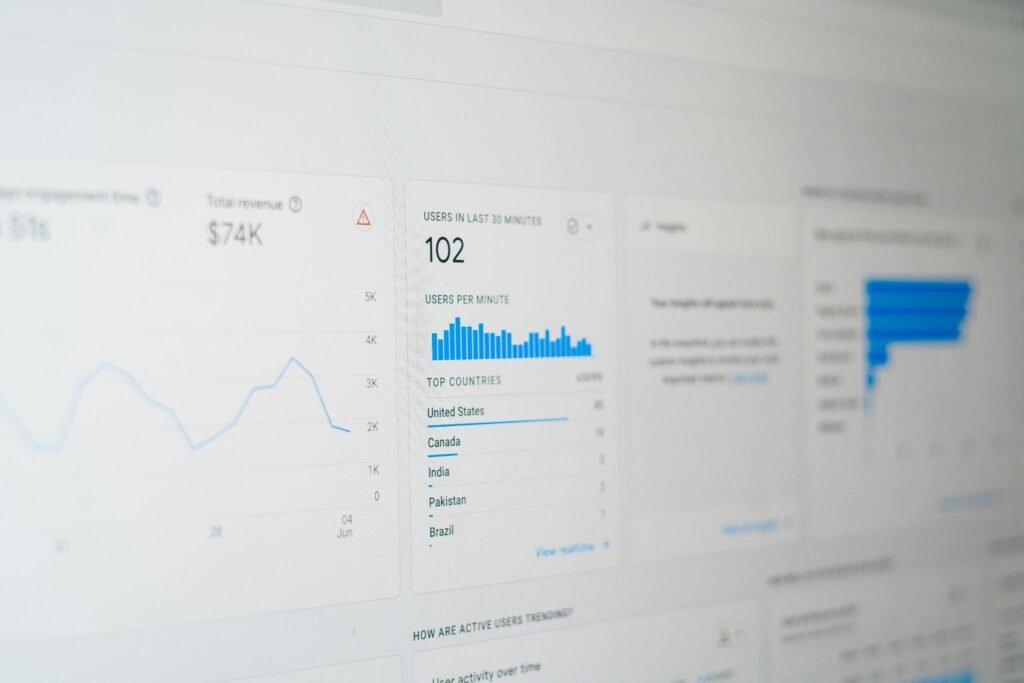
You can’t improve what you don’t measure. For multi-location businesses, tracking needs to happen at the branch level, not just the domain level.
Tools to Track Each Location Separately
Google Search Console Free and essential. Set up filters to track performance for each location’s URL path (e.g., /locations/chicago). Monitor impressions, clicks, and average position for location-specific keywords.
Google Analytics 4 Create location-specific segments or use URL parameters to track traffic, conversions, and user behavior on each location page separately.
BrightLocal The industry standard for local SEO tracking. Monitor Local 3-Pack rankings for each location, track review growth, and audit citation consistency — all from one dashboard.
Google Business Profile Insights Check each GBP listing monthly for views, direction requests, phone calls, and website clicks. These metrics tell you how your local search visibility translates into real customer actions.
Semrush or Ahrefs Use these for keyword rank tracking, competitor analysis, and backlink monitoring at the domain and page level.
Key Metrics to Monitor Monthly
For each location, track these every month:
- Local 3-Pack ranking for primary keywords
- Organic traffic to the location page
- GBP views, calls, and direction requests
- Review count and average rating
- Citation consistency score
- Backlinks pointing to the location page
- Page load speed on mobile
Set up a simple dashboard — even a Google Sheet works — where you compare these metrics across all locations every month. You’ll quickly see which branches are thriving and which ones need attention.
Conclusion
Local SEO for multiple locations isn’t complicated once you have the right system. The businesses that dominate local search in every city they operate in aren’t doing anything magical — they’re just doing the fundamentals consistently and at scale.
Build the right architecture. Create genuinely unique location pages. Keep your GBP listings active. Maintain consistent NAP data. Build local links for every branch. And yes — optimize for AI chatboxes, because that’s where a growing share of your future customers are searching.
Start with your top five locations. Get those right. Then scale the system across every branch you have.
The businesses that show up everywhere online don’t have bigger budgets. They have better systems.
FAQs
1. Can I use the same content for multiple location pages?
No — and this is one of the most important rules in multi-location SEO. Duplicate content across location pages confuses Google and results in weak or unstable rankings for all affected pages. Every location page must have genuinely unique content that speaks to that specific city, neighborhood, and community.
2. How long does local SEO take to show results?
For most businesses, you’ll start seeing meaningful improvements within 3 to 6 months of consistent optimization. New locations or very competitive markets may take up to 9 to 12 months. The key word is consistent — local SEO is not a one-time project.
3. Do I need a separate website for each location?
No. In fact, separate websites typically hurt more than they help. Keep all locations under one main domain using a subfolder structure. This consolidates your domain authority and makes the entire website stronger, not weaker.
4. How many Google Business Profiles can I have?
You can have one Google Business Profile per physical location. If you have 20 locations, you should have 20 GBP listings — each verified, fully completed, and actively managed.
5. Will optimizing for AI chatbots hurt my Google rankings?
Not at all. The practices that help you appear in AI chat answers — structured content, schema markup, consistent NAP, strong reviews, authoritative links — are the same practices that improve your Google rankings. GEO and traditional SEO complement each other perfectly.