


Your competitor just jumped three positions overnight. Their blog post is ranking above yours. Their traffic is growing — and yours isn’t moving.
What do they know that you don’t?
The answer is probably sitting right in their traffic data. Knowing how to track competitor website traffic is one of the most powerful advantages you can have in digital marketing. It removes the guesswork. It shows you what’s working in your niche right now — not what worked two years ago.
In this guide, you’ll learn exactly how to analyze competitor website traffic step by step, which tools to use (free and paid), what metrics actually matter, and how to turn that data into a strategy that moves your rankings forward.
What Is Competitor Website Traffic Analysis?
Competitor website traffic analysis is the process of studying how much traffic a rival website gets, where that traffic comes from, and what content is driving it. It gives you a clear picture of your competition’s strengths, weaknesses, and opportunities you may be missing.
Think of it like this: before opening a restaurant, you’d look at what other restaurants in the area are serving, how busy they are, and why customers keep coming back. Competitor traffic analysis does the same thing — digitally.
Why Should You Track Competitor Traffic?
Most businesses make the mistake of only looking inward. They track their own rankings, their own traffic, their own performance. But without comparing that data to what’s happening around you, you’re flying blind.
Here’s what competitor traffic tracking reveals:
- Which keywords are sending real organic traffic to your rivals (not just what they target — what actually works)
- Which traffic channels they rely on — organic search, paid ads, social, referrals, email
- What content performs best on their site, so you can create something better
- Where their audience is coming from geographically, which can point to untapped markets
- Traffic trends over time — are they growing, declining, or seasonal?
This isn’t spying. It’s smart market research. And every top digital marketer does it.
What Metrics Actually Matter?
Not all traffic data is created equal. When analyzing a competitor’s website, focus on these core metrics:
- Monthly Visits — total volume of traffic, gives you a benchmark
- Unique Visitors — how many individual people visit (not repeat sessions)
- Bounce Rate — if it’s high, their content may not be engaging visitors well
- Average Visit Duration — longer means better content engagement
- Pages Per Visit — shows how deep people go into the site
- Traffic Sources — organic, direct, referral, paid, social
- Top Pages — the pages driving the most traffic
Once you know which metrics to look at, you need the right tools to pull that data.

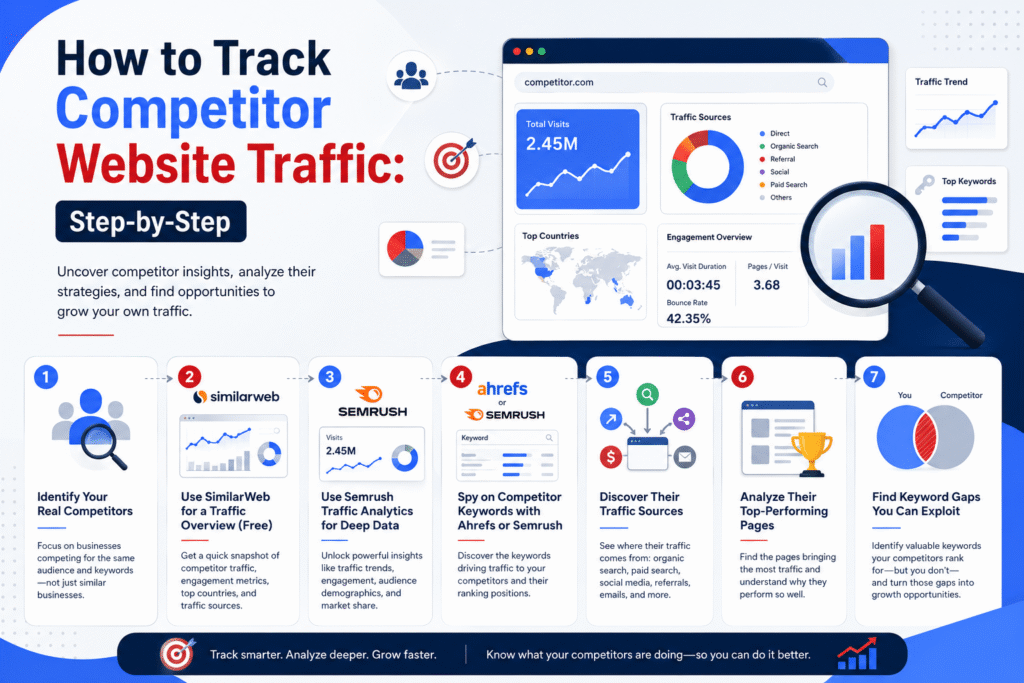
How to Track Competitor Website Traffic: Step-by-Step
Here’s a practical, step-by-step process you can follow today — even with free tools.
Step 1 — Identify Your Real Competitors
Before analyzing traffic, you need to know who to analyze. And here’s the thing — your SEO competitors aren’t always the same as your business competitors.
A business selling project management software might compete against Asana in sales. But in Google search results, a productivity blog could be ranking for the same keywords and stealing far more traffic.
How to find your true competitors:
- Open Google and search your main keyword (e.g., “best CRM for small business”)
- Note the top 5–10 results — these are your search competitors
- Repeat for 3–5 of your most important keywords
- Look for domains that appear repeatedly across multiple searches — those are your core rivals
Combining competitor research with a proper keyword research strategy helps you discover realistic ranking opportunities instead of chasing highly competitive terms.
Keep a simple spreadsheet. List 3–5 competitors you’ll track consistently.
Step 2 — Use SimilarWeb for a Traffic Overview (Free)
SimilarWeb is the best starting point for competitor traffic analysis, and you don’t need a paid account for a useful overview.
Go to similarweb.com, type in your competitor’s domain, and hit Enter. Within seconds you’ll see:
- Total monthly visits
- Global and country ranking
- Top traffic sources (search, direct, social, referral, email)
- Top referring countries
- Average visit duration and bounce rate
- Top keywords driving organic traffic
The free version gives you the last month of data and a limited keyword list. That’s more than enough to form a solid picture of where a competitor stands.
Step 3 — Use Semrush Traffic Analytics for Deep Data
If you want to go deeper, Semrush’s Traffic Analytics tool is the industry standard. It shows you not just volume, but the full story behind the numbers.
With a Semrush account, you can:
- Compare up to 5 competitor domains side by side
- See traffic trends over 6–12 months (to spot growth or decline patterns)
- Break down traffic by channel: organic, paid, referral, social, direct, email
- View monthly unique visitors and engagement data
- Identify the specific pages driving the most traffic
To get started: Enter a competitor’s URL in the Traffic Analytics tool. Look first at the traffic trend graph — is their traffic growing month over month, or declining? Then check the traffic source breakdown. A site getting 80% of its traffic from organic search is playing a very different game than one relying on paid ads.
Step 4 — Spy on Competitor Keywords with Ahrefs or Semrush
Knowing a competitor gets 50,000 monthly visits is useful. Knowing which keywords are sending those visits is where the real value lies.
Both Ahrefs and Semrush let you enter any domain and see its full keyword ranking list — including search volume, ranking position, and estimated traffic per keyword.
Here’s how to use this effectively:
- Enter your competitor’s domain in Ahrefs Site Explorer or Semrush’s Organic Research tool
- Sort keywords by Traffic % — these are the keywords driving the most visitors
- Filter for keywords where the competitor ranks in positions 1–10
- Look for keywords where your site doesn’t rank at all — these are your gaps
- Prioritize keywords with decent volume (500+ searches/month) and lower difficulty scores
Export the top 20–30 keywords. You’ll typically find 5–10 terms where you could rank but haven’t created content yet. That’s your next editorial calendar.
Step 5 — Discover Their Traffic Sources
Traffic sources tell you a competitor’s full marketing strategy — not just SEO, but every channel they invest in.
In SimilarWeb or Semrush, look at the channel breakdown:
- Organic Search: High organic traffic means they’ve invested heavily in SEO and content
- Direct Traffic: Strong direct traffic signals a loyal audience or strong brand recognition
- Referral Traffic: Check which websites are sending them traffic — those are potential link-building targets for you
- Social: Which platforms are driving visits? This shows where their audience hangs out
- Paid Search: If they’re heavily investing in PPC, those keywords have commercial value — consider targeting them organically
If a competitor is getting large referral traffic from a specific website, go get a link from that site too. Their endorsement is already proven to send relevant visitors.
Step 6 — Analyze Their Top-Performing Pages
Most competitor analysis tools will show you a site’s top pages by traffic. This is one of the most actionable insights you can get.
In Semrush, navigate to Traffic Analytics → Top Pages. In SimilarWeb, look under “Popular Pages.”
For each top page, ask:
- What topic is this page about?
- What keyword is it targeting?
- Is it ranking mainly from organic search, or another channel?
- How comprehensive and up-to-date is the content?
If a competitor’s blog post on a specific topic is pulling tens of thousands of visits per month, that’s a market signal. People want that information. This approach is a key part of content marketing, where businesses create valuable resources designed to attract and convert their target audience.
Step 7 — Find Keyword Gaps You Can Exploit
A keyword gap analysis shows you keywords your competitors rank for — but you don’t. This is where you find your fastest ranking opportunities.
In Semrush: Use the Keyword Gap tool. Enter your domain and 2–4 competitor domains. Filter for keywords where competitors rank in the top 10 but your site doesn’t appear at all.
In Ahrefs: Use the Content Gap feature under Site Explorer. Same concept — enter competitor domains and find keywords they share that you’re missing.
Sort by search volume and pick keywords with a keyword difficulty score of 30 or below. These represent the best “quick win” opportunities — relevant topics you can create content for and rank on without a huge domain authority advantage.
Best Free Tools to Check Competitor Website Traffic
You don’t have to spend a dollar to start tracking competitor traffic. These free tools give you a solid foundation:
| Tool | Type | Best For | Key Features | Pricing |
|---|---|---|---|---|
| SimilarWeb | Free & Paid | Quick competitor traffic checks | Monthly visits, traffic sources, keywords, locations | Free / Paid from $199+ |
| Ubersuggest | Free & Paid | Beginners & basic SEO research | Traffic estimates, keywords, domain authority | Free (3 searches/day) |
| SpyFu | Free & Paid | PPC & competitor ad research | Organic pages, ad copy, PPC history | Free / Paid from $39/month |
| Google Search Console | Free | Your own website analysis | Clicks, impressions, CTR, rankings | Free |
| SimilarWeb Extension | Free | Instant traffic insights | Quick website traffic estimates in Chrome | Free |
| Semrush | Paid | Complete competitor analysis | Traffic Analytics, Keyword Gap, Backlinks, PPC research | From $139.95/month |
| Ahrefs | Paid | SEO & backlink analysis | Keywords, backlinks, content gaps, ranking changes | From $99/month |
| SimilarWeb Premium | Paid | Enterprise research | Historical data, demographics, keyword & location insights | From $199/month |
| SpyFu Premium | Paid | PPC intelligence | Long-term keyword & ad history tracking | From $39/month |
| SE Ranking | Paid | Affordable SEO analysis | Traffic insights, rankings, competitor tracking | From $65/month |
Key Metrics to Focus On During Competitor Traffic Analysis
Data without interpretation is just noise. Here’s what each metric actually tells you:
Monthly Visits & Unique Visitors
Monthly visits measure total sessions. Unique visitors measure individual people. A site with 100,000 visits but only 30,000 unique visitors has a very loyal returning audience. A site with 100,000 visits and 95,000 unique visitors is heavily dependent on new discovery — usually through SEO or paid ads.
Bounce Rate & Session Duration
A competitor with a low bounce rate (under 40%) and long session duration (3+ minutes) is producing content people genuinely engage with. That’s your quality benchmark. If their bounce rate is high, there’s an opportunity to create content that does a better job keeping visitors on the page.
Traffic Sources Breakdown
This single metric summarizes an entire marketing strategy. Heavy organic traffic means they’ve invested in SEO. Heavy paid traffic means they’re buying visibility, which may not be sustainable. Heavy social means they have a strong community. Balanced traffic across multiple sources signals a mature, resilient marketing operation.
Top-Performing Pages
Which pages are sending the most traffic? Are they blog posts, landing pages, product pages, or tools? This tells you what content format your audience values most — and what you should be creating.
How to Turn Competitor Traffic Data Into Your SEO Strategy
Analysis means nothing without action. Here’s how to convert competitor traffic data into concrete steps:
Fill Content Gaps
Run a keyword gap analysis as described in Step 7. Make a list of 10–20 keywords your competitors rank for that you don’t. Prioritize by search volume and low difficulty. Create well-researched, comprehensive blog posts targeting those keywords. This is one of the fastest ways to capture organic traffic you’re currently leaving on the table.
Steal Backlink Sources
From your competitor analysis, you know which sites are linking to their top pages. Those referring domains are already proven to link to content in your niche. Export a competitor’s top referring domains from Ahrefs or Semrush. Reach out to those sites with a pitch for your own content — especially if your article is more comprehensive or up-to-date.
Target Low-Competition Keywords Your Rivals Rank For
Not every keyword a competitor ranks for is worth chasing. Focus on keywords where they rank between positions 5–20 (meaning they’re not dominant) and where the keyword difficulty is under 35. These represent topics where you can realistically outrank them with strong, targeted content. A well-optimized 2,000-word article targeting a low-competition term can hit page one within weeks, not months.

Conclusion
Tracking competitor website traffic isn’t about copying — it’s about understanding. When you know which keywords are actually sending traffic to your rivals, where their audience comes from, and what content keeps visitors engaged, you stop guessing and start making decisions backed by real market data.
The process doesn’t have to be complicated. Start with SimilarWeb for a free overview today. Pick 3–5 competitors. Look at their top pages. Find 5 keywords they rank for that you don’t. Create better content around those keywords.
That’s not a secret strategy — it’s just good competitive intelligence, done consistently.
The sites dominating page one of Google aren’t luckier than you. They’re just more informed. Now you have the tools to close that gap.
FAQS
1. Can I check competitor website traffic for free?
Yes. Tools like SimilarWeb’s free version, Ubersuggest, and SpyFu all offer free competitor traffic data. SimilarWeb is the best starting point — no account required to get basic traffic volume, sources, and top keyword data for any domain. The free data is limited but more than enough for initial research.
2. How accurate are competitor traffic tools?
Competitor traffic tools provide estimates, not exact data. They work by aggregating behavioral data from millions of anonymous users and combining it with web crawler data. SimilarWeb tends to be the most accurate for mid-to-large sites (5,000–100,000 monthly visitors). For very small sites under 1,000 monthly visits, accuracy drops and data may not be available. Always treat the numbers as directional benchmarks rather than precise figures.
3. How often should I track competitor traffic?
Once a month is a good rhythm for most businesses. Monthly tracking gives you enough data to spot meaningful trends without overwhelming you with noise. If you’re in a fast-moving niche (like tech, finance, or news), consider weekly checks on your top 2–3 rivals using a tool like SimilarWeb’s browser extension for quick snapshots.
4. What is the best tool to check competitor website traffic?
For most people, the best starting point is SimilarWeb (free) for a quick overview and Semrush (paid) for deep analysis. SimilarWeb leads in accuracy for traffic volume estimates. Semrush leads for keyword intelligence and SEO strategy. If budget is a concern, start with SimilarWeb free + Ubersuggest and upgrade when your needs grow.
5. Is it legal to track competitor website traffic?
Absolutely. All the tools mentioned use publicly available data and anonymized clickstream data. None of them access private analytics accounts or breach any laws. Competitor traffic analysis is a standard, widely-used practice in digital marketing.