

Summarize this blog post with: ChatGPT | Perplexity | Claude | Grok
You’ve set up your Shopify store, uploaded your products, and maybe even installed an SEO app or two. But without a clear process, it’s easy to miss the technical and on-page details that decide whether Google and AI tools ever surface your store. In this guide, we’ll walk you through every step, from technical setup to content and link building, so you can audit your store and start driving organic traffic with confidence.
Key Takeaways
- A Shopify SEO checklist is a prioritized list of technical, on-page, content, and off-page tasks that improve a store’s visibility in Google and AI search tools.
- Technical foundations such as indexing, Submit your sitemap to Google, canonical tags, and site speed must be handled first because they determine whether search engines can crawl and rank the store’s pages.
- Product and collection pages need unique titles, meta descriptions, descriptions, and image alt text, because duplicate or manufacturer-supplied copy rarely ranks.
- Structured data, especially Product and Breadcrumb schema, helps search engines and AI tools understand price, availability, and reviews, and can earn rich results.
- Shopify-specific quirks, such as duplicate product URLs through collections and fixed URL prefixes, require awareness but are mostly handled through built-in canonical tags.
- Content marketing and backlink building support product pages by capturing informational searches and building domain authority over time.
- Store owners can handle most checklist items themselves, while an expert Shopify SEO service becomes worthwhile when technical issues, content volume, or link building exceed in-house time and skills.
What Is a Shopify SEO Checklist?
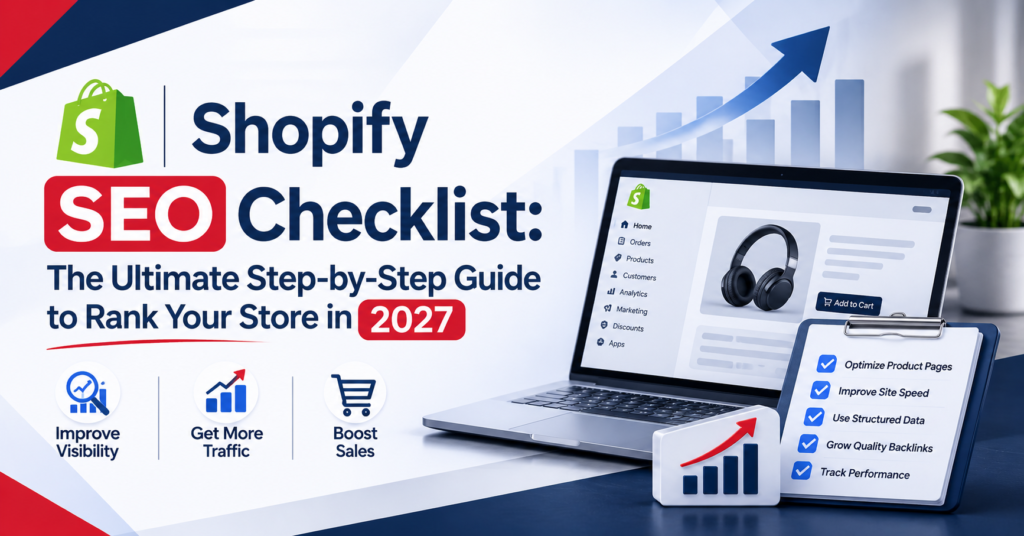
A Shopify SEO checklist is a structured list of technical, on-page, content, and off-page tasks that help a Shopify store rank higher in search engines and appear in AI-generated answers. Think of it as a repeatable audit you can run on your store every quarter. For example, one line item might be “submit your sitemap to Google Search Console,” while another is “write a unique title tag for every collection page.”
Shopify SEO differs from general SEO because the platform handles some tasks for you and restricts others. First, Shopify automatically generates a sitemap, adds canonical tags, and includes SSL. At the same time, you can’t remove the fixed URL prefixes (/products/, /collections/, /pages/, /blogs/), so you have to work around them. For example, a product URL will always read yourstore.com/products/blue-ceramic-mug, never yourstore.com/blue-ceramic-mug.
Here is how this checklist is organized. Each phase builds on the one before it, so you can work through them in order or jump to the area where your store is weakest.
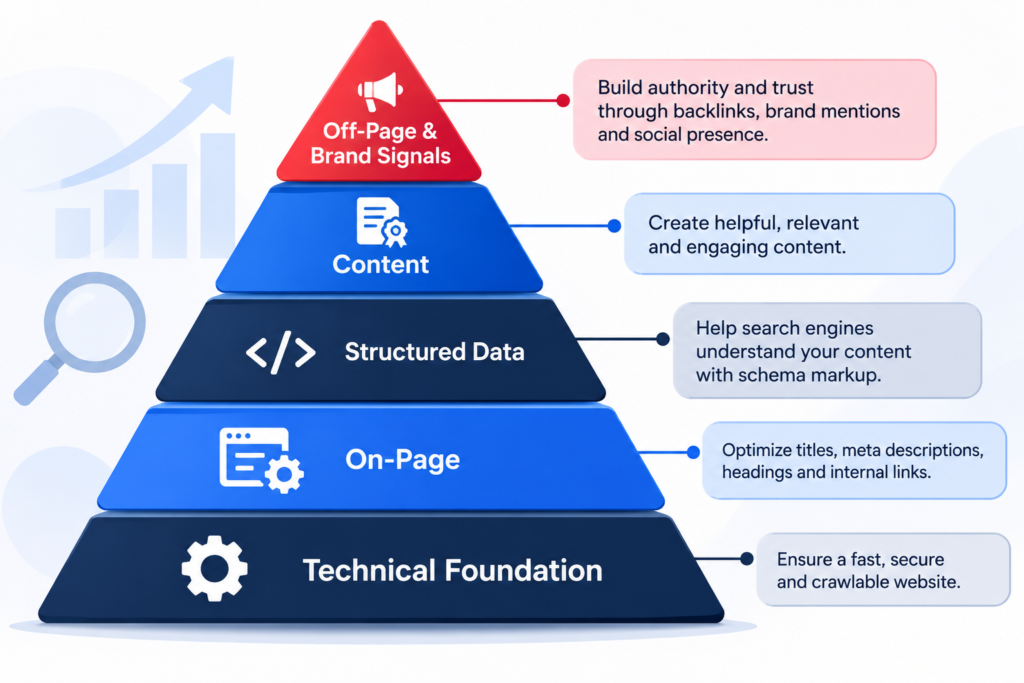
For a primer on the fundamentals behind all of this, read our guide on what search engine optimization is and how it works.
Why Does a Shopify SEO Checklist Matter for Your Store?
A Shopify SEO checklist matters because organic search is a lower-cost, compounding traffic channel that keeps working after you stop paying for it. Paid ads stop delivering the moment your budget runs out. A well-optimized collection page, on the other hand, can keep bringing in buyers for years.
The data supports this. Organic search accounted for 23.56% of ecommerce website traffic — Source: Similarweb, 2025 (as reported by SEO Sherpa).
Moreover, non-branded organic search remains one of the top revenue channels for ecommerce stores, second only to paid search in a panel of 75 ecommerce sites — Source: Search Engine Land, 2025.
As such, ignoring SEO means leaving one of your most efficient channels untouched.
In addition, Shopify’s popularity makes the competition tough. Thousands of stores sell similar products with the same manufacturer descriptions and the same themes. A checklist helps you catch the platform-specific mistakes that quietly hold stores back, such as duplicate content, bloated apps, and missing metadata.
If you want an expert’s eyes on your store before you start, our free SEO audit is a quick way to see where you stand.
Is Shopify Good for SEO?
Shopify is good for SEO out of the box, but it needs configuration to perform well. The platform ships with clean code, mobile-responsive themes, automatic sitemaps, canonical tags, and free SSL. However, it does not write your titles, fix your thin content, or build your links.
Let’s look at the trade-offs in a quick comparison.
| Area | What Shopify Handles | What You Still Need to Do |
|---|---|---|
| Security | Free SSL on every store | Nothing; verify HTTPS redirects |
| Sitemap | Auto-generated at /sitemap.xml | Submit to Google Search Console and Bing |
| Duplicate URLs | Canonical tags on collection-based product URLs | Link internally to the main /products/ URL |
| Page speed | Fast hosting and CDN | Choose a light theme, compress images, limit apps |
| Metadata | Editable fields for each page | Write unique titles and descriptions |
| URL structure | Fixed prefixes | Keep handles short and keyword-focused |
How Do You Set Up Technical SEO on a Shopify Store?
Technical SEO on Shopify means making sure search engines can find, crawl, and index every important page on your store. It’s the foundation of the whole checklist because nothing else matters if Google can’t see your pages. Before you start, consider running a technical SEO audit to spot issues quickly.
Remove the Storefront Password and Allow Indexing
A password-protected Shopify store blocks search engines from crawling it. This is a common mistake for stores that launched from a development phase. To check, go to Online Store > Preferences and make sure password protection is turned off. For example, if you see “Restrict access to visitors with the password” enabled, uncheck it and save.
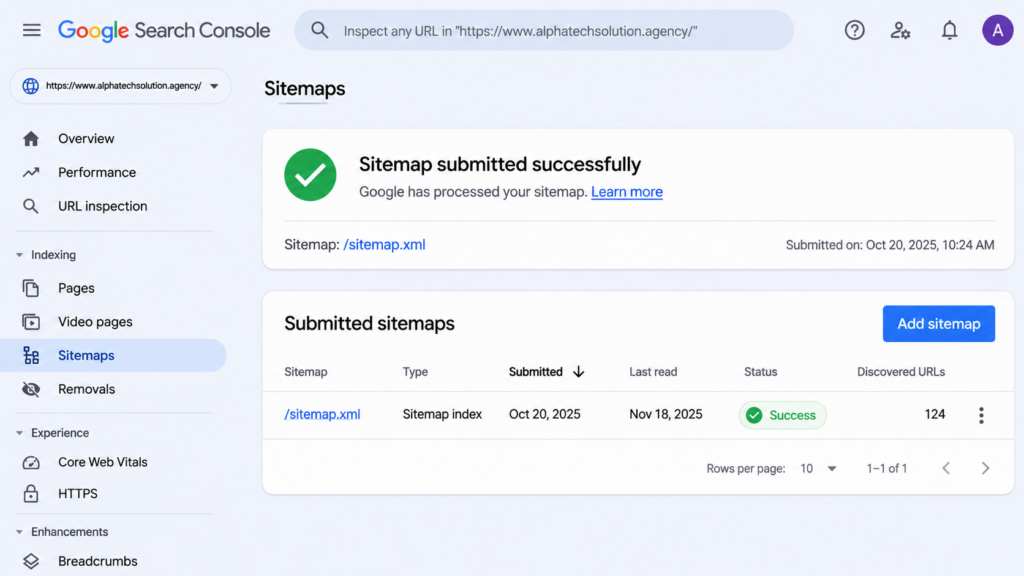
How Do You Submit Your Shopify Sitemap to Google Search Console?
Submitting a Shopify store’s XML sitemap involves opening Google Search Console, selecting the store’s property, going to Sitemaps, and entering the sitemap.xml URL that Shopify generates automatically. First, verify your domain in the Search Console. Then enter sitemap.xml in the “Add a new sitemap” field and click Submit. Shopify’s main sitemap links to separate child sitemaps for products, collections, pages, and blog posts.
You can then import your property into Bing Webmaster Tools directly from Search Console, which takes just a few clicks. If you need help getting started, search Google’s own Search Console documentation for the verification steps.
How Do You Fix Duplicate Content and Canonical Issues on Shopify?
Shopify handles duplicate product URLs by adding canonical tags that point collection-based product URLs to the main /products/ URL, which tells search engines which version to index. A single product can be reached at /products/mug and /collections/kitchen/products/mug. Fortunately, the canonical tag consolidates these signals to the first version.
That being said, you can still help by making sure your internal links, menus, and collection grids point to the clean /products/ URL. Also, check your theme’s code for a canonical_url tag in the head. For example, a quick “View page source” search for rel=”canonical” confirms it is present.
Should You Customize robots.txt on Shopify?
Shopify’s default robots.txt file already blocks low-value URLs such as cart, checkout, and certain filtered collection pages. For most stores, the default is enough. If you need to change it, go to Online Store > Themes > Edit code > Add a new template > robots.txt, which creates a robots.txt.liquid file.
Only edit it if you have a clear reason. For example, you might block internal search result pages or, on the other hand, make sure AI crawlers you want citations from are not accidentally blocked.
How Do You Speed Up a Shopify Store for Better SEO?
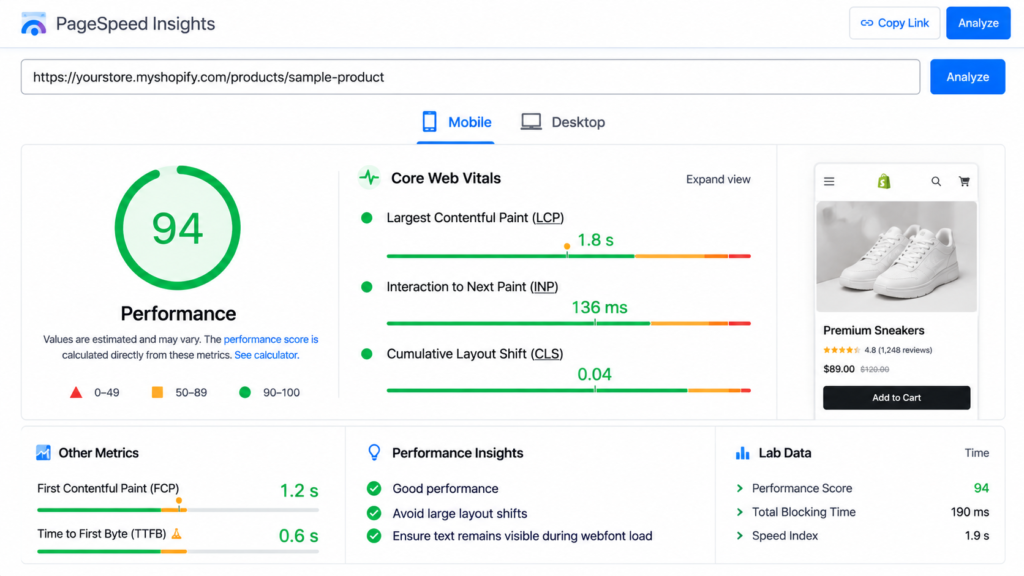
Speeding up a Shopify store means choosing a lightweight theme, compressing images, and removing unnecessary apps and scripts. Speed matters for rankings and revenue. A 0.1-second improvement in mobile load speed increased retail conversions by 8.4% and average order value by 9.2% — Source: Deloitte & Google, 2020 (as cited by Scube Marketing).
To measure performance, use Core Web Vitals, Google’s set of page experience metrics. The “good” thresholds are an LCP of 2.5 seconds or less, INP of 200 milliseconds or less, and CLS of 0.1 or less — Source: Google web.dev, 2024. Here is how to hit them:
- Pick a fast theme. Start with a lightweight, well-reviewed theme.
- Compress images. Upload WebP or compressed JPEGs and avoid oversized banners.
- Audit your apps. Remove apps you no longer use, since leftover app code often keeps loading.
- Lazy-load below-the-fold images. This reduces initial load time.
If your theme needs a rebuild, our Shopify website design service covers performance-focused builds.
Is Your Store Mobile-Friendly with a Flat Architecture?
A flat site architecture means every important page is reachable within three clicks from the homepage. This helps both shoppers and crawlers. For example, a path like Home → Kitchen → Ceramic Mugs → Blue Ceramic Mug keeps products close to the surface.
In addition, preview every template on a phone, because most Shopify traffic is mobile. Check that menus open easily, buttons are tappable, and product images load quickly.
How Do You Optimize Shopify Product and Collection Pages for SEO?
Optimizing a Shopify product page for SEO involves writing a unique title tag and meta description, a keyword-aware product description, descriptive image alt text, and Product schema markup. These elements tell search engines what each page is about. For deeper guidance, see these on-page SEO best practices.
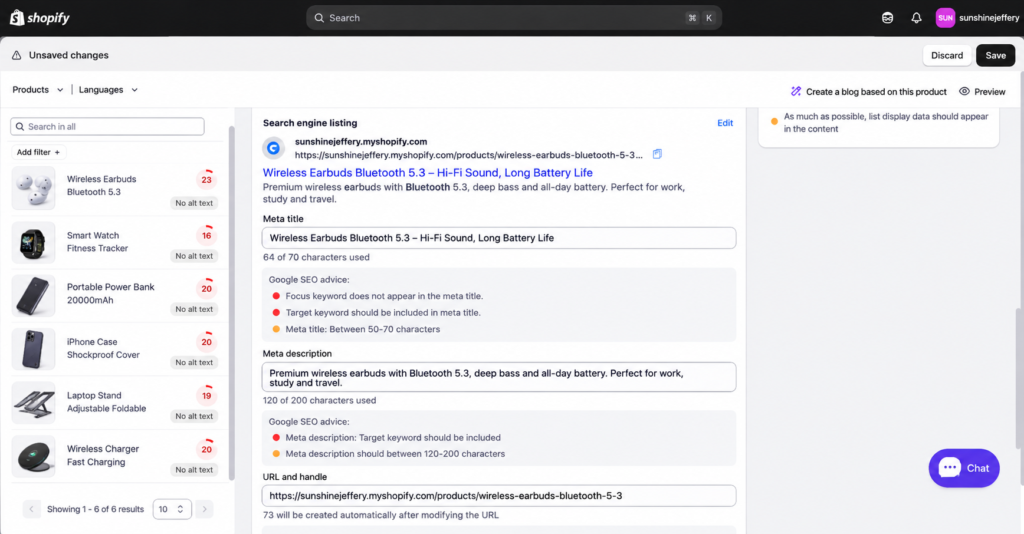
How Do You Write Title Tags and Meta Descriptions in Shopify?
A title tag is the clickable headline in search results, and it should include the main keyword and stay under roughly 60 characters. In Shopify, scroll to “Search engine listing” on any product, collection, page, or blog post and click Edit. For example, a title like “Blue Ceramic Mug | Handmade Stoneware | YourBrand” works better than “Product 1.”
Meanwhile, keep meta descriptions near 155 characters and write them like a short ad. You can test yours with our free SEO meta optimization tool.
How Do You Optimize Shopify Product Pages for SEO?
Product page optimization focuses on unique descriptions, clean URL handles, one H1, and image alt text. Follow this order for each product:
- Write a unique description. Avoid copying the manufacturer’s text, because dozens of other stores use the same words.
- Use a short URL handle. For example, blue-ceramic-mug beats blue-handmade-ceramic-coffee-mug-12oz-v2.
- Use one H1. Most themes set the product title as the H1, so don’t add a second one.
- Add alt text and file names. Name files like blue-ceramic-mug-front.jpg and describe what the image shows.
- Link internally. Point to related collections and complementary products.
If you change a handle, tick “Create a URL redirect” so the old URL passes its value to the new one. Our guide on product page optimization is a good next stop for a deeper walkthrough.
How Do You Optimize Shopify Collection Pages for SEO?
Collection page SEO means adding unique introductory copy, a keyword-focused title, and clear links to your top products. Collection pages often target your highest-volume commercial keywords, such as “ceramic coffee mugs.” As such, add 100 to 200 words of helpful copy above or below the product grid.
For example, explain how to choose between stoneware and porcelain, then link to your best sellers. Also, watch for faceted filter URLs, since they can create many near-duplicate pages if left unchecked.
How Do You Add Structured Data (Schema) to a Shopify Store?
Structured data is code that labels your page content, such as price, availability, and reviews, so search engines and AI tools can understand it. Most modern Shopify themes output Product schema automatically. However, theme code and review apps can sometimes output overlapping markup.
Here are the types to prioritize:
- Product schema: price, availability, brand, and review ratings.
- BreadcrumbList schema: shows the page’s path in search results.
- Organization schema: helps establish your brand’s identity.
- FAQ schema: use it where it makes sense, but note that Google now shows FAQ rich results only for a limited set of sites, so treat it as a clarity boost rather than a guaranteed rich result.
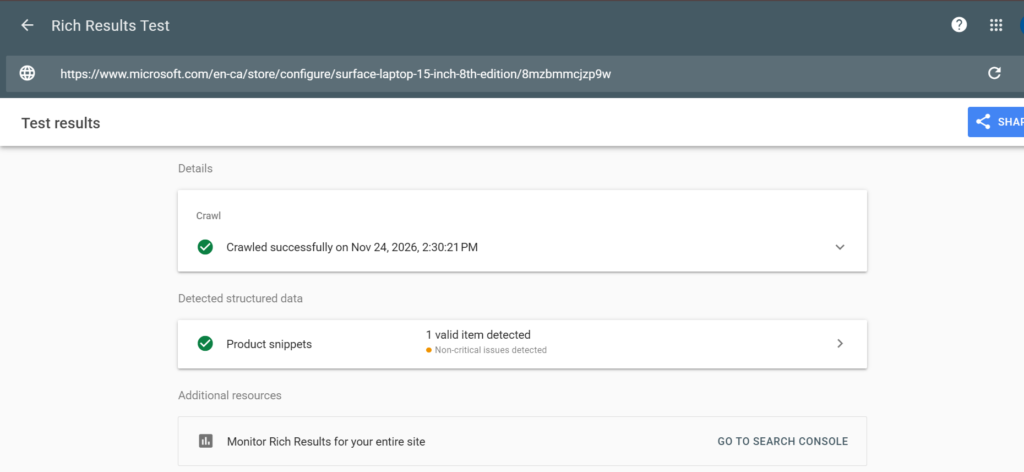
Afterward, validate your pages with Google’s Rich Results Test. For example, paste a product URL and look for duplicate or conflicting Product items, which often mean both your theme and an app are adding markup. For more on this topic, read our guide to schema markup for e-commerce.
What Are the Best Shopify SEO Tips for Content and Keywords?
The best Shopify SEO tips for content and keywords start with matching each page to one clear search intent. Commercial and transactional keywords belong on collection and product pages. Informational keywords belong on blog posts that guide shoppers toward those pages.
How Do You Do Keyword Research for a Shopify Store?
Keyword research for an online store means finding the phrases shoppers use at each stage of buying, then mapping each phrase to one page. For example, “ceramic mug set” fits a collection page, while “how to choose a coffee mug” fits a blog post. Mapping one primary keyword per page prevents your own pages from competing.
Start with free tools like Google Search Console and Google autocomplete. Then add a paid tool like Ahrefs or Semrush for volume and difficulty data. Our guide to content marketing for online stores shows how to turn keyword lists into a publishing plan.
How Should You Build Topical Content and E-E-A-T?
E-E-A-T stands for experience, expertise, authoritativeness, and trustworthiness, and it describes the quality signals search engines look for. Build these by adding author bios, a detailed About page, and clear shipping, return, and contact policies. For example, a buying guide written by your in-house product specialist shows real experience.
In addition, support each collection with 3 to 5 related blog posts and link them together. Refresh your best content every 6 to 12 months to keep facts and prices current.
How Do You Prepare Your Store for AI Search?
AI search readiness means making your product facts clear, consistent, and easy for AI systems to extract. This matters, but keep it in perspective. ChatGPT drove just 1.48% of organic revenue across 94 ecommerce sites, although its traffic converted 31% higher than non-branded organic — Source: Search Engine Land (Visibility Labs analysis), 2025.
As a result, AI visibility should complement traditional SEO, not replace it. Write answer-first descriptions, keep specs in clean text, collect reviews, and don’t block the AI crawlers you want citations from in robots.txt. For a deeper look, see our guide to ranking in Google’s AI search results.
How Do You Build Backlinks for a Shopify Store?
Backlink building for a Shopify store means earning links from relevant, trusted websites that point to your homepage, collections, products, and content. Links act as votes of confidence, so quality matters more than quantity. For example, one link from a respected industry blog beats dozens from low-quality directories.
Here are practical e-commerce link-building tactics:
- Digital PR: pitch a data study or original product story to journalists.
- Supplier and partner links: ask brands you stock to list you as a retailer.
- Guest content: contribute expert articles to niche publications.
- Unlinked mentions: find places that mention your brand without a link and ask for one.
You can learn more about this in our link building strategies overview.
Should You Use Google Business Profile and Reviews?
A Google Business Profile helps stores with a physical location or pickup point appear in local search and Maps. If you have a local presence, claim and complete your profile. Our guide to local SEO for small businesses walks through the process.
Meanwhile, reviews build trust for every store. Send a follow-up email asking for reviews after delivery, and display them on product pages with proper markup.
Which Shopify SEO Apps and Tools Are Worth Using?
The best Shopify SEO tools are the ones that give you data or save time without slowing your store down. Start with free tools from Google, then add paid tools as your needs grow. You can compare more options in our roundup of SEO tools for e-commerce.
| Checklist Phase | Recommended Tool | Free Alternative |
|---|---|---|
| Indexing and sitemap | Google Search Console | Bing Webmaster Tools |
| Technical crawl | Screaming Frog | Google Search Console reports |
| Page speed | PageSpeed Insights | Chrome Lighthouse |
| Keyword research | Ahrefs or Semrush | Google autocomplete and Search Console |
| Metadata checks | AlphaTech meta score checker | Manual SERP preview |
| Schema validation | Rich Results Test | Schema Markup Validator |
| Analytics | Google Analytics 4 | Shopify’s built-in reports |
A word of caution on apps: every Shopify app can add scripts that slow your pages down. Therefore, install only what you need, and test your PageSpeed score before and after each new app.
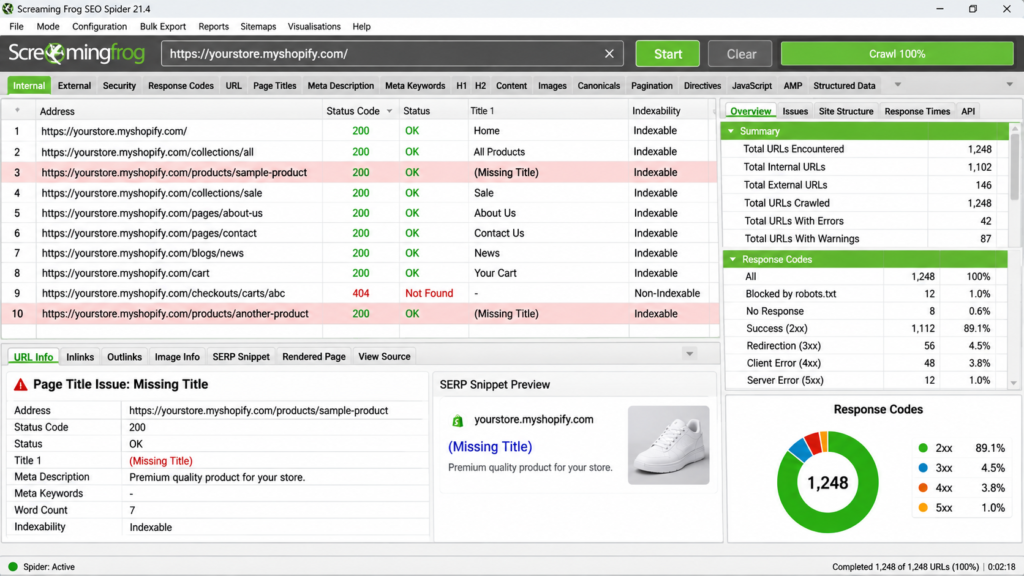
[Insert image: Screaming Frog crawl of a Shopify store with response codes and missing titles | Alt text: “Crawl a Shopify store for SEO issues with Screaming Frog”]
What Do Shopify SEO Services Include, and Do You Need One?
Shopify SEO services typically include a technical audit, on-page optimization, content creation, link building, and ongoing reporting to grow a store’s organic traffic and revenue. If you’ve worked through the checklist above and still feel stuck, an expert partner may help. Our own Shopify SEO service follows this approach.
What Do SEO Services for Shopify Look Like in Practice?
A good Shopify SEO service starts with an audit and ends with transparent reporting tied to revenue. Expect these deliverables:
- A technical audit covering indexing, speed, and duplicate content.
- On-page fixes for products, collections, and pages.
- A content plan with keyword mapping.
- Link building and digital PR.
- Monthly reports on organic sessions, rankings, and revenue.
For context, AlphaTech Solution reports generating over $3M in organic revenue for a U.S. eCommerce client within one year — Source: AlphaTech Solution, 2026.
When Should You Hire a Shopify SEO Service Instead of Doing It Yourself?
You should hire a Shopify SEO service when technical issues, content volume, or link building exceed your time and skills. Common signs include flat traffic after three to six months of effort, a large catalog, a migration, or a team with no SEO experience. For example, a store with 5,000 products and duplicate descriptions is hard to fix manually.
Before you hire, ask these questions: Who does the work? How do they report? What have they achieved for similar stores? Beware of anyone who guarantees a #1 ranking. If you’d like a conversation, you can contact our team for a no-pressure chat.
How Long Does Shopify SEO Take to Work?
Shopify SEO typically takes three to six months to show meaningful results, although timing varies by competition and starting point. Quick technical fixes can improve indexing within weeks. Content and links, however, take longer to compound. Treat any timeline as a rough guide rather than a promise.
What’s Next: Your 30-60-90 Day Shopify SEO Action Plan
A 30-60-90 day Shopify SEO plan breaks the checklist into quick wins, foundation fixes, and growth work so you can make steady progress. By following this order, you handle the highest-impact items first.
| Timeframe | Focus | Key Tasks |
|---|---|---|
| Week 1 | Quick wins | Remove password, verify Search Console, submit sitemap, fix broken titles |
| Month 1 | Foundation fixes | Optimize top 20 product and collection pages, compress images, remove unused apps, validate schema |
| Months 2-3 | Growth work | Publish supporting blog content, start link building, add review collection, refresh old pages |
To measure progress, track four KPIs: organic sessions, impressions, product-page rankings, and revenue from organic. Use Google Search Console for impressions and rankings, and Google Analytics 4 for sessions and revenue. If you’d like a second opinion on your plan, request a Shopify SEO audit.
Conclusion
A Shopify SEO checklist turns a vague goal into a clear process you can repeat. You now know how to fix your technical foundation, optimize products and collections, add structured data, create helpful content, and earn trusted links. Consistent small improvements compound into durable organic growth, and you don’t need to do everything at once.
Pick one section today, whether that’s submitting your sitemap or rewriting your top five title tags, and start there. And if you’d rather have experts handle the heavy lifting, explore our Shopify SEO services or get in touch.