

Summarize this blog post with: ChatGPT | Claude | Grok
You already know how much your Google Business Profile drives calls, directions, and walk-ins, which is why a suspension feels like your storefront vanishing overnight. What most owners miss is that Google rarely explains exactly why a profile was suspended, and a poorly prepared appeal can make things worse. In this guide, you’ll learn how to diagnose your suspension type, fix the violation, and submit a reinstatement request that gives you the best chance of getting your listing back.
Key Takeaways
- A suspended Google Business Profile is a listing that Google has restricted or removed for violating its guidelines or failing verification, which limits or eliminates its visibility on Search and Maps.
- Soft suspensions leave the listing visible but uneditable, while hard suspensions remove the listing from Google Search and Maps entirely.
- Most suspensions are caused by ineligible addresses, business name or category issues, failed verification, duplicate listings, or policy-violating content.
- Reinstatement requires fixing the underlying violation first, then submitting Google’s official reinstatement request form with accurate supporting evidence.
- Strong evidence includes a business license, a utility bill or lease, signage and storefront photos, and a working website that matches the profile details.
- Suspension review times vary, and no one can guarantee a result, so businesses should keep backup lead channels active while waiting.
- Suspensions are best prevented by keeping the business name, address, and categories accurate and by avoiding unnecessary edits to a verified profile.
What Does It Mean When a Google Business Profile Is Suspended?
A suspended Google Business Profile is a business listing that Google has restricted or removed from Search and Maps because it violates Google’s Business Profile guidelines or failed verification. Google applies the label when it believes the listing is ineligible, misleading, or unverifiable. For example, a plumber listing a rented mailbox as a “shop” can trigger a suspension even if the plumbing work is real.
First, it helps to know that “suspended” covers two very different situations. Second, a profile that is merely unverified or flagged for review is not the same thing, and the fix is different. Let’s break down each state.
What Is the Difference Between a Soft and a Hard Google Business Profile Suspension?
A soft suspension leaves a Business Profile visible on Google but prevents the owner from editing or managing it, while a hard suspension removes the profile from Search and Maps. In a soft suspension, customers may still see your listing, but you cannot update hours, reply to reviews, or change details. In a hard suspension, the listing disappears from public results and you lose management access.
For example, a salon with a soft suspension might still show on Maps with an old phone number the owner can’t fix. A salon with a hard suspension won’t appear at all when customers search its name.
| Feature | Soft Suspension | Hard Suspension |
|---|---|---|
| Visible on Search and Maps | Usually yes | No |
| Owner can edit the profile | No | No (access lost) |
| Typical cause | Failed or missing verification, edits that triggered review | Serious or repeated guideline violations |
| Impact on leads | Reduced, with outdated info | Severe; the listing is gone |
| Typical fix | Verify or resubmit with corrected details | Reinstatement request with evidence |
How Do I Check Whether My Google Business Profile Is Suspended?
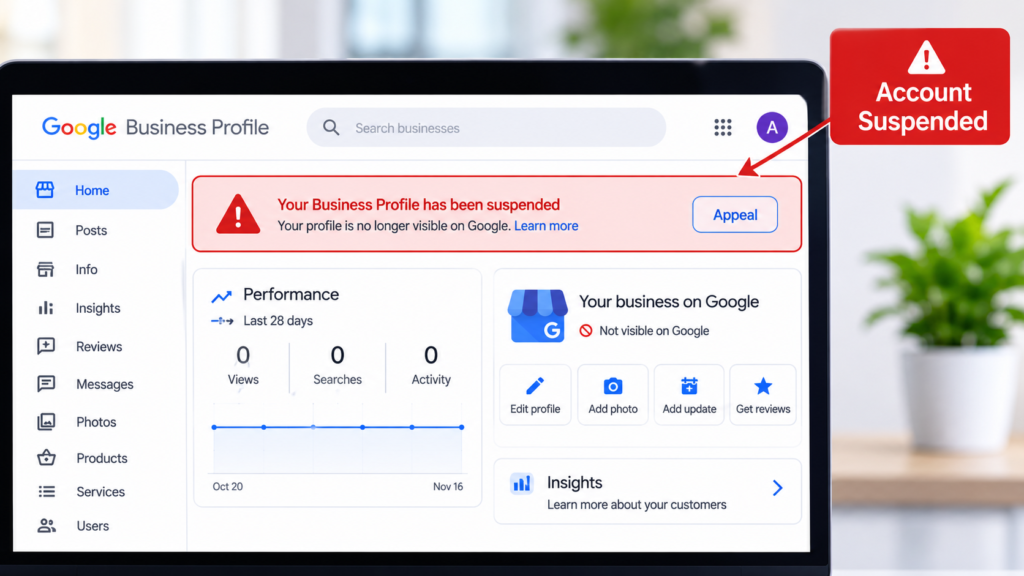
You can confirm a suspension by checking three places: your Business Profile dashboard, your email notifications, and Google Search or Maps. Moreover, comparing all three prevents you from mistaking a verification request for a full suspension. Birdeye’s guide notes that a profile missing from Search or Maps can signal a hard suspension, while a “Suspended” notice in the dashboard confirms it. A profile that disappears from Search or Maps may point to a hard suspension, and a “Suspended” notification in the dashboard confirms one.
Use this quick-diagnosis checklist:
- Dashboard: Look for a “Suspended” or “Needs verification” message when you sign in.
- Email: Search your inbox for messages from Google Business Profile about policy violations or removal.
- Search: Look up your exact business name and city in an incognito window.
- Maps: Search for your business on Google Maps while signed out.
- Access: Try editing a detail such as your business hours. If the option is blocked, suspect a soft suspension.
Why Does a Google Business Profile Suspension Matter?
A Google Business Profile suspension matters because it can cut off calls, direction requests, website clicks, and reviews from customers who are ready to buy. Local searchers often have high intent. For instance, someone searching “emergency dentist near me” will call whichever clinic appears first, and a suspended clinic simply doesn’t appear.
Research highlights just how important online visibility and reviews are for local businesses:
- 97% of consumers read online reviews for local businesses — Source: BrightLocal, Local Consumer Review Survey 2026.
- 47% of consumers won’t use a business with fewer than 20 reviews — Source: BrightLocal, Local Consumer Review Survey 2026.
- 74% of consumers look for reviews written within the last three months — Source: BrightLocal, Local Consumer Review Survey 2026.
In addition, speed matters. Every day offline sends customers to competitors, and Search Engine Journal has reported that suspensions have been rising while appeals are being delayed. As such, a careful first submission is better than a rushed one, because mistakes in your appeal can slow reinstatement.
Plus, a suspension can disconnect you from the signals that help you rank. Reviews, photos, and engagement history are tied to the listing. To understand what you stand to lose, read our breakdown of local SEO ranking factors.
Why Was My Google Business Profile Suspended?
The most common causes of Google Business Profile suspensions are ineligible addresses such as virtual offices or PO boxes, misleading business names or categories, failed verification, and duplicate listings, according to Google’s Business Profile guidelines. Google rarely names the exact violation, so you often have to audit your listing yourself. Review the Google Business Profile guidelines before anything else.
Ineligible or Risky Addresses
An ineligible address is a location that Google doesn’t accept as a real, staffed place where customers can be served. This includes PO boxes, virtual offices, and co-working spaces without staff present during business hours. For example, a law firm using a shared mailbox address as its “office” is a classic suspension trigger.
Service-Area Violations
A service-area business serves customers at their locations and should hide its address instead of showing a storefront it doesn’t have. Moreover, listing a service area far beyond where you actually work can look deceptive. For example, a locksmith claiming ten cities from a single apartment can be flagged.
Business Name and Category Issues
Business name violations occur when the profile name adds keywords, locations, or taglines that aren’t part of your real-world branding. For example, “Best Cheap Plumber Lahore 24/7” instead of “Smith Plumbing” can trigger a review. Likewise, ineligible categories or business types can result in removal.
Duplicate Listings, Failed Verification, and Suspicious Edits
Duplicate or conflicting listings confuse Google’s systems and can get one or both profiles restricted. Furthermore, failing verification repeatedly signals that you can’t prove control of the business. Finally, big edits to a verified profile, such as changing the name, address, or category at once, can prompt re-review.
Misleading Content and Review-Policy Violations
Misleading or prohibited content includes fake claims, spammy photos, and policy-breaking reviews. For example, buying reviews or posting reviews from staff accounts can put a profile at risk.
How Do I Get My Suspended Google Business Profile Reinstated?
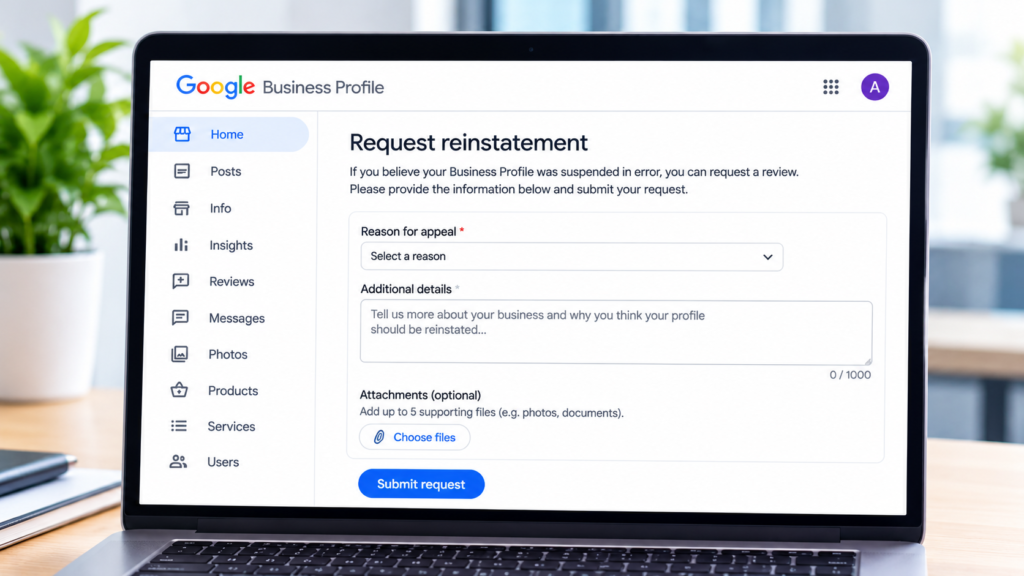
Reinstating a suspended Google Business Profile involves fixing the guideline violation, gathering proof that the business is real and eligible, and submitting Google’s official reinstatement request form. Birdeye describes the process as more structured and transparent than before, and notes that Google doesn’t charge for reinstatement. Follow these steps in order.
- Fix the violation first. If your name contains extra keywords, remove them. If your address is ineligible, correct it. Don’t submit until the listing matches reality.
- Gather proof. Collect the documents listed in the next section so your evidence matches the profile exactly.
- Submit the reinstatement request form. Use Google’s official form and provide accurate details. Avoid creating new profiles in the meantime.
- Track your response. Watch the email tied to the profile and check the dashboard. Keep copies of everything you submit.
- Follow up appropriately. If denied, review the reason, strengthen your evidence, and resubmit.
Can I Create a New Google Business Profile If Mine Is Suspended?
Creating a new profile for the same business while the original is suspended is generally a bad idea because it can create a duplicate and further violate guidelines. For example, a restaurant that opens a second listing may end up with both profiles flagged. Resolve the original suspension instead.
What Should I Do If My Reinstatement Request Is Denied?
If a reinstatement request is denied, the best response is to identify what was missing, strengthen your evidence, and resubmit. For instance, a denial after submitting a blurry storefront photo may be fixed with clear, timestamped photos showing signage. Additionally, you can ask for peer help in the Google Business Profile Community, where experienced volunteers often spot overlooked issues.
What Documents Do I Need to Appeal a Google Business Profile Suspension?
The documents that best support a Google Business Profile appeal are those that prove your business name, address, and operation are real and match your profile. Consistency is key.
Use this evidence checklist:
- Business license or registration showing your legal name
- Tax or incorporation documents
- Utility bill or lease showing the business name and address
- Storefront and signage photos (exterior, interior, and signage visible)
- Working website that matches the profile name, address, and phone
- Social profiles consistent with the business
- Service vehicles, uniforms, or equipment photos for service-area businesses
For example, a home-cleaning company without a storefront could submit its business registration, branded vehicle photos, and an invoice showing its service area.
Sample Appeal Message Structure
Keep your message short and factual:
- State your business (name, category, location).
- Explain what you fixed (for example, “I removed extra keywords from the business name”).
- List attached evidence in plain terms.
- Request review politely, without emotion or accusations.
How Long Does It Take to Reinstate a Suspended Google Business Profile?
Reinstatement timelines vary, and no one can guarantee a specific result or date. Some businesses hear back within days, while others wait longer, especially when review queues are backed up. For example, a request with complete, matching evidence is generally easier to review than one with conflicting details. Be wary of anyone promising guaranteed reinstatement, because the decision rests with Google.
How Can I Prevent My Google Business Profile From Being Suspended Again?
Preventing a Google Business Profile suspension involves keeping the business name, address, categories, and hours accurate, and avoiding unnecessary edits to a verified profile. By following a routine, you can lower the risk of another review.
Does Changing My Business Name or Address Cause a Suspension?
Changing a business name or address can trigger a re-review, especially on a verified profile, but legitimate changes are allowed when they reflect real-world updates. For example, if you move locations, update your address and keep proof such as a new lease ready. Avoid making several major edits at once.
Compliance Checklist
- Use your real-world business name only
- Use an eligible, staffed address, or hide it if you’re a service-area business
- Choose accurate primary and secondary categories
- Monitor for spam edits and duplicates weekly
- Build consistent listings through local citation building
- Follow review rules and focus on managing Google reviews the right way
What Tools and Resources Can Help With a Google Business Profile Suspension?
The most useful resources are Google’s own help pages and tools, supported by monitoring and audit tools. Start with free options, then add paid tools if you manage many locations.
- Google Business Profile Help and Guidelines (free): the authoritative policy source
- Google’s reinstatement request form (free): the official appeal channel
- Google Business Profile Community (free): peer support from experienced users
- Local SEO monitoring tools: for example, Whitespark or BrightLocal, which can track listings and rankings
- A local SEO audit: use our local SEO audit checklist to catch issues before Google does
How Do I Keep Getting Leads While My Google Business Profile Is Suspended?
You can keep generating leads during a suspension by strengthening other channels such as your website, paid ads, and third-party directories. For example, a clinic can run a branded search ad and keep its Bing Places and Apple Business listings active. Moreover, improving your service pages can help you rank organically. If paid search fits your budget, explore Google Ads for local businesses
What Should I Do Next?
After a suspension, the next steps are to diagnose, fix, gather evidence, submit, and monitor. Work through this list:
- Diagnose: Confirm whether it’s a soft or hard suspension.
- Fix: Correct name, address, category, or content issues.
- Gather evidence: Collect the documents from the checklist above.
- Submit: File one clear, accurate reinstatement request.
- Monitor: Track email and the dashboard, and keep backup lead sources running.
If you’d rather have specialists handle it, our local SEO services team can help.
Conclusion
Most Google Business Profile suspensions are fixable when you identify the cause, correct it, and appeal with honest, well-organized evidence. Stay calm, avoid shortcuts like creating duplicate listings, and keep your business information consistent everywhere. A compliant profile does more than avoid suspension, because it protects your long-term local visibility and the customers who depend on it. You’ve got a clear plan now, so start with the diagnosis today.
FAQs
1. Why was my Google Business Profile suspended for no reason?
A profile that looks suspended “for no reason” usually has a hidden guideline issue, such as a keyword-stuffed name, an ineligible address, or a recent edit that triggered review. Google rarely states the exact cause, so audit your name, address, category, and website for mismatches.
2. How do I know if my Google Business Profile is suspended or just unverified?
A suspended profile shows a “Suspended” notice and blocks editing, while an unverified profile asks you to complete verification. If your listing is missing from Search and Maps, it may be a hard suspension.
3. How long does it take to get a Google Business Profile reinstated?
Reinstatement can take anywhere from a few days to several weeks, and Google doesn’t guarantee a timeline. Requests with complete, consistent evidence tend to move more smoothly than incomplete ones.
4. Is there a fee to reinstate a suspended Google Business Profile?
No, Google doesn’t charge a fee to submit a reinstatement request. Costs only apply if you hire a consultant or agency to prepare the appeal.
5. Can I appeal a Google Business Profile suspension more than once?
Yes, you can resubmit after a denial, but only after fixing the issue and strengthening your evidence. Sending the same request repeatedly without changes rarely helps.
6. What documents do I need to reinstate a suspended Google Business Profile?
Useful documents include a business license, a utility bill or lease, storefront and signage photos, and a website matching your profile details. Make sure the business name and address are identical across every document.
7. Can a virtual office or PO box cause a Google Business Profile suspension?
Yes, virtual offices, PO boxes, and unstaffed co-working spaces are common triggers because Google requires a real, staffed location. Service-area businesses should hide their address instead.
8. Does changing my business name or address get my profile suspended?
Major edits to a verified profile can trigger a re-review, but legitimate updates are allowed. Change one detail at a time and keep proof, like a new lease or registration.
9. Can fake reviews or spam edits cause a suspension?
Yes, review-policy violations and spam activity can put a profile at risk. Avoid buying reviews or posting from staff accounts, and monitor for suspicious edits.
10. Can a competitor get my Google Business Profile suspended?
Competitors can report your listing or submit suspicious edits, but a suspension still depends on whether your profile violates guidelines. Keep your details accurate and check for unwanted edits regularly.
11. How can I get leads while my Google Business Profile is suspended?
You can keep leads flowing through your website, paid search ads, and other directories like Bing Places and Apple Business Connect. Updating key service pages can also help organic traffic.
12. How do I prevent my Google Business Profile from being suspended again?
Keep your name, address, categories, and hours accurate, avoid unnecessary edits, and follow Google’s guidelines. Check your listing weekly for duplicates and unauthorized changes.