


You’re hungry, so you pull out your phone and type “pizza near me.” You tap one of the first three places you see. You never scroll down.
Your customers do the same thing. If your business isn’t one of those first few results, a lot of them will never find you.
That’s the problem local SEO optimization solves. It’s the work of helping your business show up when people search nearby, in Google Maps, in the local results box, and in regular search. Our Sydney local SEO checklist helps businesses cover the key steps to improve their local visibility.
This guide is for small business owners, marketers, and freelancers who want a clear plan. You’ll learn how Google decides who ranks, what to fix first, a step-by-step process, how to track your results, and which mistakes to avoid. There are no tricks here that could get your listing in trouble.
What Is Local SEO Optimization?
Local SEO optimization is the process of improving your online presence so your business appears when people search for products or services in a specific area. It covers Google Maps, the local pack, and regular search results for searches like “dentist in Austin” or “coffee shop near me.”
You may also see it called local search engine optimization. It’s the same thing, and it can help service-based businesses improve their visibility, including through pest control SEO.

How Local SEO Is Different From Regular SEO
Regular SEO tries to get a web page to rank for a topic, no matter where the searcher is. Local SEO tries to get a business to rank for people who are close to it.
That creates three big differences:
- Location matters. Two people searching “plumber” in different neighborhoods can see different results.
- Your Google Business Profile matters a lot. This is the free listing that shows your hours, reviews, photos, and map pin. For many local searches, it does more work than your website.
- Reviews and listings count. Google looks at what customers say about you and whether your details match across the web.
Your website still matters. It just isn’t the only thing that matters.
Which Type of Business Are You?
Your setup changes what you should focus on. Find yourself in this table.
| Business Type | Example | What to Focus On |
|---|---|---|
| Storefront | Café, salon, dental clinic | A public address on your profile, reviews, a clear location page, local links |
| Service-area | Plumber, electrician, cleaner | Hide your address if customers don’t visit you, set your service areas, build a page for each main service |
| Online only | Software, online store | Local SEO probably isn’t the right tool |
That last row surprises people. Google’s rules say a business needs in-person contact with customers to qualify for a Business Profile. If you only sell online, normal SEO is a better fit.

How Google Ranks Local Results
Google has said that local results are based mainly on three things: relevance, distance, and prominence.
- Relevance is how well your listing matches what the person searched for. A complete profile with the right categories helps here.
- Distance is how far your business is from the searcher, or from the place they typed into the search.
- Prominence is how well known your business is. Reviews, links from other sites, mentions around the web, and a strong website all feed into it.
You can’t change distance. You can’t move your shop closer to the searcher, and you shouldn’t fake an address to try. But you have a lot of control over relevance and prominence, and that’s where this guide spends its time.
Local Pack vs. Regular Results
When you search for a local service, you usually see a map with about three businesses. That’s the local pack. Below it are the regular blue-link results.
The local pack leans heavily on your Google Business Profile. The regular results lean more on your website content and links. You want to show up in both, and the steps below help with both.

Local SEO for Business: What to Fix First
Most guides give you a long list and no order. That’s how people burn a month on low-value tasks. Here is a rough order that works for most businesses.
| Priority | Task | Impact | Effort |
|---|---|---|---|
| 1 | Complete and correct your Google Business Profile | High | Low |
| 2 | Get more reviews and reply to them | High | Medium, ongoing |
| 3 | Make your name, address, and phone match everywhere | Medium | Low |
| 4 | Build a page for each main service | High | Medium |
| 5 | Clean up and add key listings | Medium | Low to medium |
| 6 | Earn a few local links | Medium to high | High |
| 7 | Add local business schema | Low to medium | Low |
This order comes from how these factors usually play out, not from a rule Google published. Your market may be different. But if you only have two hours a week, spend them on the first two rows.
Small Business Local SEO: The Step-by-Step Process
Work through these in order. Each step builds on the one before it.
Step 1: Claim and Optimize Your Google Business Profile
Search for your business on Google. If a profile exists, claim it. If not, create one at google.com/business. Then verify it. Google will ask you to confirm through a phone call, text, email, or video, depending on your business.
Once you’re in, fill out everything:
- Business name: Use your real name, exactly as it appears on your sign and in the real world. Don’t add keywords like “Best Cheap Plumber Austin.” Google’s guidelines don’t allow it, and it can get your profile suspended.
- Primary category: This is one of the most important choices you’ll make. Pick the one that describes your main business, not a nice-sounding one. Then add a few secondary categories that are true.
- Address or service area: Storefronts show their address. Service-area businesses can hide it and list the areas they serve. Only list areas you really cover.
- Hours: Include holiday hours. Wrong hours frustrate customers and lead to bad reviews.
- Description: You get 750 characters. Say what you do, who you help, and where. Write it for people, not for Google.
- Services and products: Add each one with a short, plain description.
- Photos: Upload real photos of your place, your team, and your work. Skip stock images.
- Posts and updates: Share offers, news, or new work from time to time. It shows the profile is active.
[Add a screenshot of your finished profile here. Real examples build trust.]
Step 2: Keep Your Name, Address, and Phone Number Consistent
Search engines use your name, address, and phone number (called NAP) to confirm your business is real and to match your details across the web. If those details differ from place to place, it creates doubt.
Small differences count. “Street” vs. “St.” and “Suite 4” vs. “#4” look minor, but pick one format and use it everywhere.
Here’s a quick way to check. Search your phone number in quotes on Google. Look at every listing that comes up. Fix anything that’s wrong, old, or duplicated.
If you use a tracking phone number to measure calls, keep your main number as the primary one on your profile and add the tracking number as a secondary.
Step 3: Do Local Keyword Research
Local keywords usually combine what you do with where you do it. For example:
- “emergency plumber Lahore” or “dentist in Austin” (service plus city)
- “wedding photographer near Brooklyn Heights” (service plus neighborhood)
- “how much does a roof repair cost in Denver” (question plus city)
You don’t need expensive tools to start. Try these:
- Type your service into Google and look at the autocomplete suggestions.
- Check the “People also ask” box.
- Look at your Google Search Console data to see which searches already show your site.
- Check what your top three local competitors list as their categories and services.
What about “near me” searches? You can’t really optimize a page for them. Google uses the searcher’s location to decide what’s near. What you can do is make sure your profile, address, and pages clearly show where you are.
Step 4: Optimize Your Service and Location Pages
Your website should back up what your profile says. A few rules:
- One page per main service. Don’t cram everything onto the home page.
- Put the service and place in the title tag. For example: “Roof Repair in Denver | Summit Roofing.” Keep it natural.
- Show your NAP on the page, and embed your Google map on your contact or location page.
- Write about the place. Mention neighborhoods you serve, local rules or weather problems that affect your work, and real jobs you’ve done nearby.
- Make it fast and mobile-friendly. Most local searches happen on phones.
If you serve several towns, you can build a page for each one. But each page needs real, different information. Swapping the city name on the same text creates thin pages that don’t help anyone, and Google calls these doorway pages.
Step 5: Build Citations That Matter
A citation is any mention of your business name, address, and phone number on another site. Think directories, maps, and social profiles.
Focus on the important ones instead of signing up everywhere:
- Google Business Profile
- Bing Places
- Apple Business Connect
- Yelp, if it’s used in your industry or country
- Trade directories for your industry
- Your local chamber of commerce or city business directory
A small number of accurate, trusted listings beats hundreds of random ones. Quality matters more than count.
Step 6: Earn Reviews and Reply to Them
Reviews help you rank, and they help people choose you. Most customers read them before they call.
Here’s how to get more of them the right way:
- Ask at the right time. Ask right after a good experience, when the customer is happy.
- Make it easy. Send a direct link to your review page by text or email.
- Reply to every review. Thank people who praise you. Answer unhappy customers calmly and offer to fix the problem.
- Don’t buy reviews, and don’t pay or reward people for them. Google’s rules forbid it.
- Don’t only ask happy customers. Selectively asking, sometimes called review gating, also breaks Google’s policy.
A few bad reviews won’t hurt you. A pattern of ignored complaints will.
Step 7: Earn Local Links
Links from other local sites tell Google that your business is part of the community. They’re hard to earn, which is why they’re valuable.
Ideas that work for small businesses:
- Sponsor a local team, school event, or charity run (many events link to their sponsors)
- Join your chamber of commerce or a local business group
- Partner with businesses that serve the same customers but don’t compete with you
- Offer a useful tip or quote to local news sites or community blogs
- Ask suppliers or partners to list you on their site
Don’t buy links. A few real local links beat a pile of bought ones.
Step 8: Add Local Business Schema
Schema markup is extra code that helps search engines understand your page. For local SEO, you use LocalBusiness schema. It lets you state your business name, address, phone number, hours, and location in a form machines can read easily, which is especially useful for local SEO for Dubai real estate.
It won’t magically boost your rankings. Think of it as removing confusion. If you use WordPress, many SEO plugins can add it for you. Otherwise, a developer can add it in about an hour. Whatever you use, make sure the details in your schema match your profile and website exactly.
How to Boost Local SEO in 30, 60, and 90 Days
Nobody can honestly tell you how fast you’ll rank. It depends on your city size, how many competitors you have, and how old your business profile is. A small town with few competitors can move in weeks. A busy city with strong competitors can take months.
What you can control is the work. Here’s a plan.
Days 1 to 30: Build the foundation
- Claim, verify, and fully fill out your Google Business Profile
- Fix NAP problems and remove duplicate listings
- Pick your local keywords and write them down
- Set up your review request process
Days 31 to 60: Increase visibility
- Publish or improve your main service pages
- Add your key citations
- Keep collecting reviews and replying to them
- Add photos and a post to your profile every couple of weeks
Days 61 to 90: Grow and measure
- Pitch two or three local link ideas
- Add schema
- Check your results and compare them with where you started
- Fix what’s weak, and repeat what worked
Local SEO is not a one-time job. Profiles, reviews, and competitors keep changing, so plan to check in at least once a month.
Local SEO Optimization Tips Most Guides Skip
The basics above are what everyone covers. These smaller habits can set you apart.
Study your competitors for 30 minutes. Search your main service in your city. Look at the top three businesses in the map results. Write down their categories, how many reviews they have, how often they get new ones, how many photos they have, and what services they list. You’ll quickly see what it takes to compete. This simple exercise is also a great way to create original data for your own content.
Search from different spots. Local results change with the searcher’s location. A business can rank first on your street and tenth two miles away. Check from a few areas, or use a local rank tracker that shows results on a map grid.
Check your map pin. If your pin sits in the wrong place, drivers get lost and Google gets the wrong signal. Zoom in and make sure it’s right.
Use the words customers use. Read your own reviews and the questions people ask on calls. Use those exact words on your pages. Customers rarely use industry jargon.
Don’t ignore other platforms. People also find businesses through Apple Maps, Bing, and voice assistants. Accurate listings there cost you little and can bring extra customers.
Update after any change. Moved, changed your hours, or added a service? Update your profile, website, and listings the same week.
As part of your overall online presence, make sure your social profiles, directory listings, and website all tell the same story. Customers notice when they don’t.
Metrics for Local SEO: What to Track
It’s easy to get lost in numbers. Focus on three groups.
Visibility
- Local pack position for your main searches
- Profile views and search impressions from your Business Profile performance report
- Impressions and clicks in Google Search Console for searches that include your city or service
Engagement
- Calls, direction requests, and website clicks from your profile
- Messages or booking clicks, if you use them
- Number of new reviews each month and your average rating
Business Results
- Leads and enquiries from calls, forms, and walk-ins
- Sales from new local customers
- Ask every new customer, “How did you find us?” Write the answers down.
Rankings are nice, but phone calls and sales pay the bills. Always tie your SEO work back to the third group.
Tools you can start with: Google Business Profile, Google Search Console, and Google Analytics. All are free. Add call tracking or a local rank tracker later if you need more detail.
Local SEO Mistakes That Hurt Rankings (or Get You Suspended)
- Stuffing keywords into your business name. This is one of the most common reasons profiles get suspended.
- Using a fake address or a virtual office. Google requires a real location where you can meet customers or serve them.
- Creating duplicate profiles for the same business.
- Letting listings go out of date after you move or change your phone number.
- Ignoring reviews, especially negative ones.
- Buying fake reviews or links.
- Making thin city pages that only change the town name.
- Choosing the wrong primary category.
- Never checking your results. If you don’t measure, you can’t improve.
DIY or Hire? Local SEO Optimization Services
You can do a lot of this yourself. Claiming your profile, collecting reviews, fixing your NAP, and writing service pages don’t need special skills. They need time and patience.
Hiring help makes sense when:
- You have several locations to manage
- You’re in a very competitive market and you’ve already done the basics
- You don’t have the time to keep up with reviews, updates, and reporting
- Your profile has been suspended and you need help fixing it
If you do hire someone, ask them how they’ll build reviews, what they’ll report on, and whether you’ll own your accounts. Be careful of anyone who guarantees a number one ranking. No one can promise that.
If you’d like help, take a look at our local SEO optimization services page.
Conclusion
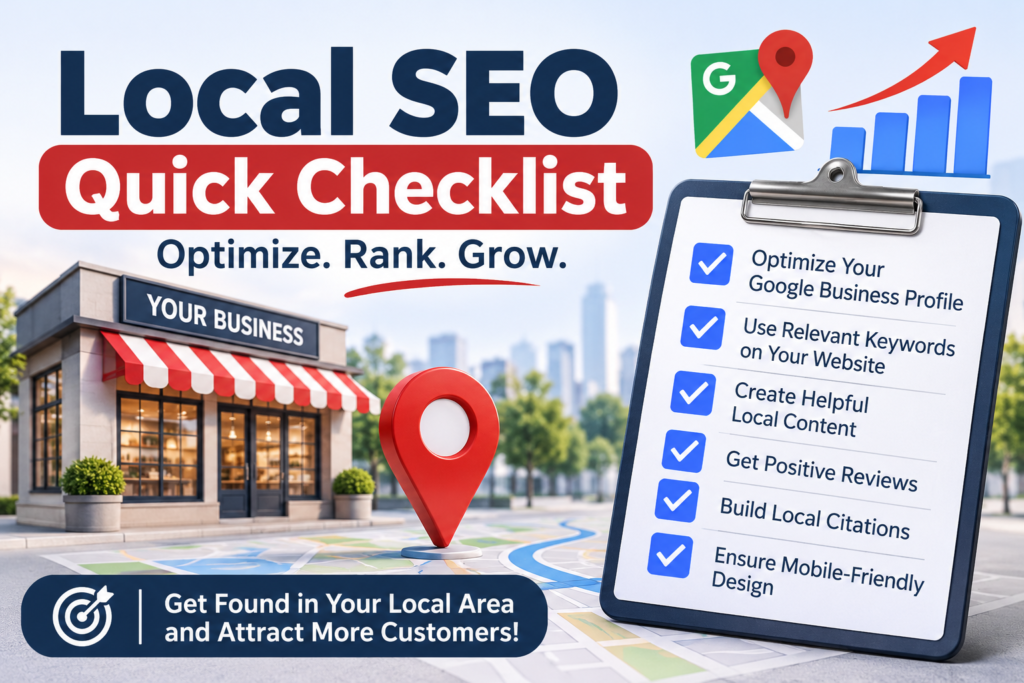
Local SEO optimization isn’t magic. It’s a list of small, honest tasks done well and kept up over time. Start with your Google Business Profile. Get more reviews. Make your details match everywhere. Then build useful pages and earn a few local links.
You don’t have to do everything this week. Pick the first two priorities from the table above, finish them, and measure what changes. Then move on to the next step.
When customers search for what you offer, you want to be one of the first three names they see. Now you know how to get there.
FAQs
1. What is local SEO optimization?
Local SEO optimization is the work you do so your business shows up in local searches, like “bakery near me.” It includes improving your Google Business Profile, keeping your listings consistent, collecting reviews, and creating helpful website pages for the places you serve.
2. How do I optimize my website for local searches?
Create a page for each main service, include your city or area in titles and headings, and show your name, address, and phone number. Add an embedded map, keep the site fast on mobile, and add local business schema so search engines understand your location.
3. How long does local SEO take to work?
It depends on your competition and where you start. Some small businesses see changes in a few weeks, while others in busy markets need several months. Steady work, especially on your profile and reviews, matters more than quick fixes.
4. Can I do local SEO myself?
Yes. Most of the basics are things you can do yourself: claim your profile, fix your listings, ask for reviews, and build clear service pages. You may want help later for link building, multiple locations, or tough competition.
5. What are the most important local ranking factors?
Google names relevance, distance, and prominence. In practice, that means an accurate and complete Business Profile, strong reviews, consistent business details, a helpful website, and a few trusted local links.